


TL;DR
- MCP (Model Context Protocol) connects AI assistants to live tools like repos, DBs, APIs, docs, and CI/CD for real context.
- The guide ranks 15+ MCP servers for startups, from GitHub and PostgreSQL to Stripe, Sentry, Cloudflare, and Figma.
- AppWizzy MCP targets production-ready full-stack app generation, not just code suggestions or Q&A.
- Suggested starter stacks vary by stage: solo founders, SaaS startups, and scaling engineering teams.
- The article argues the right MCP stack can cut repetitive work and help startups ship faster without adding headcount.
Fact Box
- MCP (Model Context Protocol) is described as an open standard for secure AI access to external systems.
- The article evaluates MCP servers using five criteria: relevance, setup, compatibility, automation, usefulness.
- It recommends solo founders start with GitHub MCP, Filesystem MCP, AppWizzy MCP, and PostgreSQL MCP.
- For SaaS startups, it suggests adding Stripe MCP, Supabase MCP, Sentry MCP, and Slack MCP.
- For scaling teams, it suggests adding Cloudflare MCP, Linear MCP, Figma MCP, and Browserbase MCP.
AI coding agents have become dramatically smarter, but without the right MCP servers, they’re still working with one hand tied behind their back. Whether you’re building your first MVP or scaling a SaaS platform, the right MCP servers can save hundreds of engineering hours, automate repetitive workflows, and turn AI assistants into true development teammates. Read this guide to discover which MCP servers are actually worth using in 2026, and which ones startups can safely ignore.
If you’re searching for the best MCP servers, you’re probably asking questions like:
- Which MCP servers are actually useful for startups?
- Which ones work best with Cursor, Claude Code, VS Code, or Windsurf?
- Which MCP servers improve developer productivity the most?
- Are there MCP servers that can generate production-ready applications instead of just writing code?
As Andrew Ng famously said: AI is the new electricity.
Today, MCP servers are becoming the infrastructure that allows this electricity to power real business workflows rather than isolated AI conversations.
The rapid adoption of AI coding assistants has created a new challenge. While models like GPT-5.5, Claude, and Gemini are excellent at generating code, they know almost nothing about your repositories, databases, APIs, documentation, deployments, or internal business logic. This lack of context leads to hallucinations, incorrect implementations, and wasted engineering time. Recent industry research consistently shows that developers spend a significant portion of their day searching for information instead of building software, making contextual AI one of the biggest productivity opportunities for engineering teams.
By the end of this guide you’ll understand:
- What do MCP servers actually do?
- Which MCP servers deserve a place in your startup stack?
- Which tools provide the biggest productivity gains?
- And how to choose the right combination for your engineering team?
What is an MCP Server?
Model Context Protocol (MCP) is an open standard that allows AI assistants to securely communicate with external systems. Instead of answering questions using only the information inside the language model, an MCP server gives AI access to live resources such as:
- GitHub repositories
- databases
- APIs
- cloud infrastructure
- documentation
- design systems
- issue trackers
- CI/CD pipelines
- internal company knowledge
Think of MCP as USB-C for AI. Just as USB-C allows one cable to connect countless devices, MCP allows one AI assistant to connect to virtually any software tool.
Instead of manually copying documentation into ChatGPT or asking developers to provide additional context, MCP delivers the necessary information automatically.
For startups, this means faster development, fewer mistakes, and significantly more capable AI workflows.
Why Startups Should Care About MCP Servers
Unlike enterprises, startups have one critical constraint: Time.
Every founder wants to launch faster while keeping engineering costs under control. MCP servers make that possible by allowing AI to perform work that previously required constant developer intervention.
Instead of asking where is the authentication middleware? Your AI assistant can simply inspect the repository.
Instead of asking can you copy yesterday’s Jira tickets? It retrieves them automatically.
Instead of manually documenting APIs, AI can generate documentation directly from your source code.
Small teams gain the equivalent of an additional engineer not because AI replaces developers, but because developers spend less time searching for information and more time building products.
How I Selected These MCP Servers
Not every MCP server deserves a place in your startup stack. For this article, I’ve evaluated servers based on five practical criteria:
- Startup relevance
- Ease of setup
- AI compatibility
- Workflow automation
- Long-term usefulness
The result is a list focused on real productivity rather than experimental projects.
AppWizzy MCP
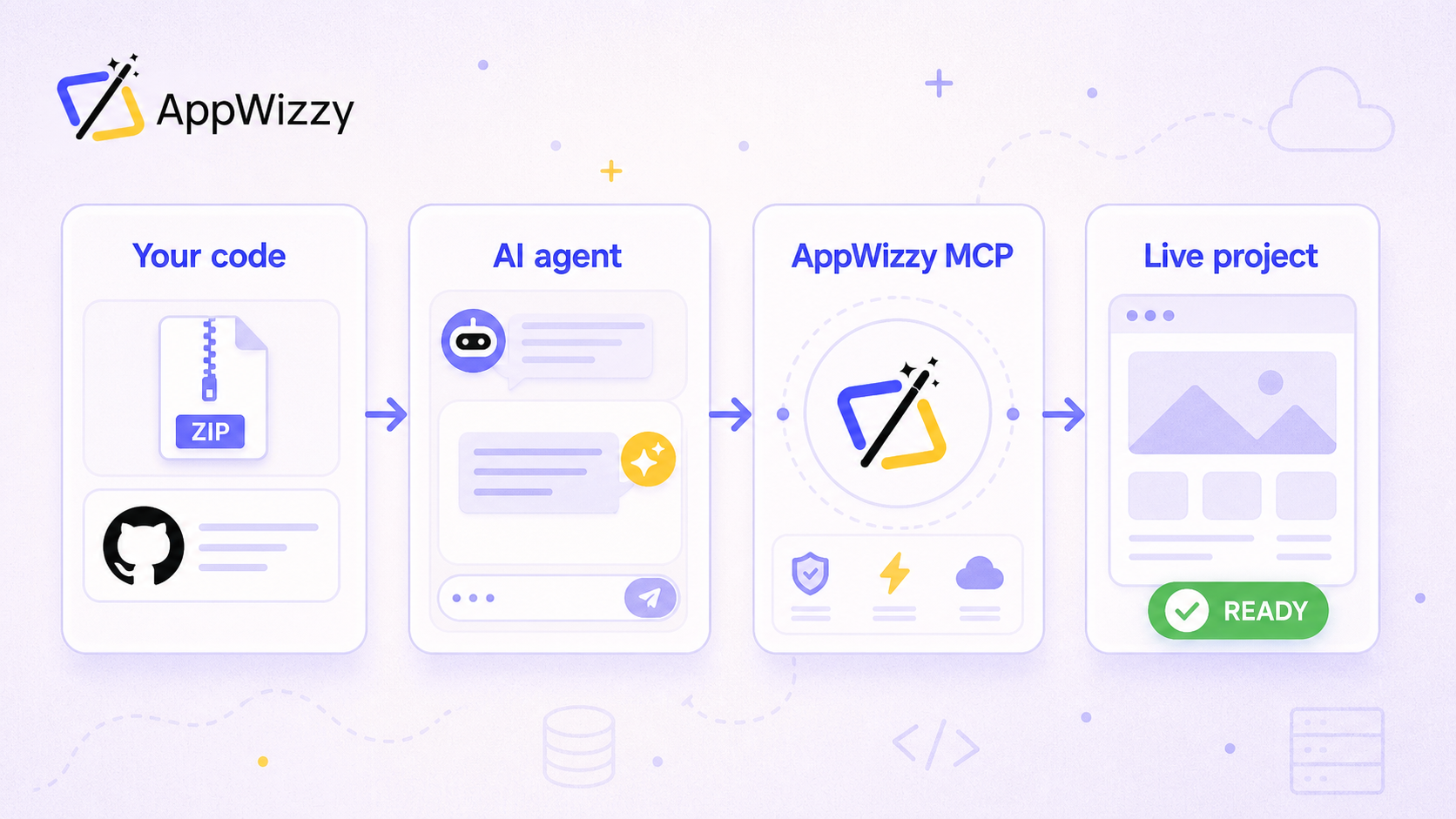
Most MCP servers help AI understand existing software. AppWizzy MCP goes one step further it helps AI build complete applications.
Designed specifically for AI coding agents, AppWizzy MCP enables tools like Cursor, Claude Code, and VS Code to generate production-ready applications using AppWizzy’s full-stack platform.
Rather than simply answering coding questions, the AI can leverage AppWizzy’s architecture, components, backend services, and project generation capabilities to accelerate development.
For startups building MVPs, admin dashboards, internal tools, or SaaS products, this means dramatically reducing the time between an idea and a working application.
Instead of spending days configuring authentication, CRUD operations, APIs, databases, and frontend architecture, developers can focus on product-specific features while AI handles much of the repetitive setup.
Key advantages include:
- Faster full-stack application generation
- AI-assisted project scaffolding
- Consistent project architecture
- Reduced boilerplate code
- Seamless integration with modern AI coding assistants
Unlike generic code generation tools, AppWizzy MCP provides AI with structured context about how applications should be assembled, helping produce more maintainable and production-ready code.
Best for
- MVP development
- SaaS startups
- Internal tools
- Rapid prototyping
- AI-powered software teams
GitHub MCP
GitHub remains the central hub for nearly every software startup. The GitHub MCP server allows AI agents to interact directly with repositories, pull requests, branches, commits, issues, releases, and code history.
Instead of pasting code snippets into an AI chat, developers can simply ask:
- Summarize yesterday’s pull requests.
- Explain why this function changed.
- Generate release notes.
- Review this feature branch.
For engineering teams practicing continuous delivery, GitHub MCP quickly becomes indispensable.
Best for
- Development teams
- Technical founders
- Release management
- Code reviews
Playwright MCP
Testing remains one of the biggest bottlenecks for startup teams.
Playwright MCP enables AI assistants to launch browsers, interact with web applications, execute user journeys, capture screenshots, and validate UI behavior.
Instead of writing lengthy testing scripts manually, developers can instruct an AI assistant:
Verify the checkout flow.
or
Find broken buttons after today’s deployment.
This dramatically accelerates regression testing.
Best for
- QA automation
- End-to-end testing
- Frontend development
PostgreSQL MCP
Almost every SaaS startup relies on PostgreSQL.
The PostgreSQL MCP server allows AI assistants to inspect schemas, execute read-only queries, understand relationships between tables, and explain complex datasets.
Rather than searching through migrations, developers can ask:
- Which tables store subscriptions?
- Why is this query slow?
- Show relationships between customers and invoices.
This significantly reduces database debugging time.
Best for
- Backend developers
- Data engineers
- Analytics teams
Linear MCP
Modern startups frequently manage product development inside Linear.
Linear MCP gives AI assistants access to projects, issues, milestones, roadmaps, labels, and sprint planning.
Developers can ask AI:
- What changed this sprint?
- Summarize blocked issues.
- Which tickets are assigned to me?
- Create release notes from completed work.
Instead of manually reviewing dozens of tickets, AI prepares concise summaries within seconds.
Best for
- Product teams
- Engineering managers
- Agile development
Slack MCP
Communication is where valuable context often gets lost.
Slack MCP enables AI assistants to search conversations, summarize channels, locate decisions, and answer questions based on team discussions.
Instead of asking colleagues:
Did we already decide this?
your AI assistant can find the answer instantly.
For distributed startups, this reduces interruptions while making institutional knowledge much easier to access.
Best for
- Remote teams
- Engineering communication
- Knowledge management
Notion MCP
Documentation often becomes outdated because nobody enjoys maintaining it.
Notion MCP allows AI assistants to read, search, summarize, and update documentation based on current project information.
This is especially valuable for startups where product specifications, onboarding guides, and engineering documentation evolve rapidly.
Developers can ask:
- Explain our authentication flow.
- Summarize the onboarding guide.
- Update the API documentation.
Without manually searching through dozens of pages.
Stripe MCP
For SaaS startups, payments are mission-critical. Stripe MCP enables AI assistants to interact with your billing infrastructure, making it easier to troubleshoot payment issues, understand subscription status, and automate financial workflows.
Instead of manually navigating the Stripe dashboard, developers can ask AI:
- Which customers experienced failed payments today?
- Explain why this subscription was canceled.
- Find invoices related to a specific customer.
- Summarize payment activity for this week.
This dramatically reduces the time spent investigating billing issues and helps support teams resolve customer requests faster.
Best for
- SaaS companies
- Subscription businesses
- Customer support
- Finance operations
Supabase MCP
Supabase has become one of the most popular backend platforms for startups, offering PostgreSQL, authentication, storage, edge functions, and real-time capabilities in one ecosystem.
Supabase MCP gives AI direct visibility into your backend environment, allowing it to inspect schemas, authentication settings, storage buckets, and serverless functions.
Instead of asking developers where authentication is configured, AI already knows.
Typical use cases include:
- Explaining database relationships
- Debugging authentication issues
- Reviewing Row Level Security (RLS) policies
- Generating SQL migrations
- Creating backend APIs
Best for
- Startup backends
- Rapid prototyping
- Full-stack development
Cloudflare MCP
Infrastructure management can quickly become overwhelming for small engineering teams.
Cloudflare MCP allows AI assistants to understand DNS configurations, Workers, Pages deployments, caching rules, firewall settings, and edge infrastructure.
Developers can simply ask:
- Why is my domain unavailable?
- Explain my caching configuration.
- Review firewall rules.
- Help deploy this Worker.
Rather than searching through multiple dashboards, AI provides actionable answers using live infrastructure context.
Best for
- DevOps
- Infrastructure
- Edge computing
- Serverless applications
Sentry MCP
Every startup eventually reaches the stage where production errors become difficult to track manually.
Sentry MCP gives AI assistants access to crash reports, stack traces, performance metrics, and application monitoring.
Instead of copying stack traces into an AI chat, developers can ask:
- Explain today’s production errors.
- Which release introduced this bug?
- Summarize the top five issues affecting users.
- Recommend a fix for this exception.
The result is faster incident response and reduced debugging time.
Best for
- Production monitoring
- Debugging
- Engineering teams
Browserbase MCP
Modern AI agents increasingly need access to real browsers rather than static HTML.
Browserbase MCP enables AI to launch cloud browsers, interact with websites, complete forms, verify user flows, and automate browser-based workflows.
This is particularly useful when testing:
- login flows
- onboarding
- payment pages
- dashboards
- customer journeys
Unlike traditional browser automation tools, Browserbase integrates directly into AI workflows, allowing coding assistants to execute and verify tasks autonomously.
Best for
- Browser automation
- QA
- AI agents
- End-to-end workflows
Figma MCP
Design and engineering alignment remains one of the biggest challenges for product teams.
Figma MCP bridges this gap by giving AI assistants access to design files, components, spacing, typography, and UI structure.
Instead of asking designers for measurements or component names, developers can ask AI:
- Explain this design.
- Generate React components from this layout.
- List design tokens.
- Identify reusable UI elements.
This significantly accelerates frontend implementation.
Best for
- Frontend teams
- Product designers
- UI development
Brave Search MCP
Not every answer exists inside your company.
Brave Search MCP enables AI assistants to retrieve up-to-date information from the web while remaining grounded in trusted search results.
Developers can use it to:
- Research new frameworks
- Find documentation
- Verify breaking API changes
- Compare competing technologies
This is particularly valuable because many language models are trained on historical data and may not reflect the latest releases.
Best for
- Technical research
- Documentation
- Competitive analysis
Filesystem MCP
Sometimes the simplest tools deliver the biggest productivity gains.
Filesystem MCP allows AI assistants to navigate local project directories, inspect files, organize documentation, update configuration files, and understand project structure.
Instead of manually copying files into chat, developers simply grant secure access to the project directory.
This enables AI to:
- Generate documentation
- Refactor code
- Update configuration files
- Organize assets
- Explain unfamiliar projects
Best for
- Solo developers
- Small engineering teams
- AI-assisted coding
Docker MCP
Containerization has become standard practice for modern software development, and Docker MCP extends AI capabilities into containerized environments.
AI assistants can inspect Dockerfiles, running containers, images, networking, and Compose configurations to help diagnose deployment issues or optimize development environments.
Typical requests include:
- Explain why this container won’t start.
- Review this Docker Compose configuration.
- Optimize my Dockerfile.
- Identify unnecessary image layers.
For startups deploying multiple microservices, Docker MCP saves valuable engineering time during local development and production troubleshooting.
Best for
- DevOps
- Backend engineering
- Containerized applications
MCP Server Comparison
| MCP Server | Primary Purpose | Best For | Startup Value |
| GitHub MCP | Repository management | Developers | ⭐⭐⭐⭐⭐ |
| Playwright MCP | Browser testing | QA | ⭐⭐⭐⭐⭐ |
| AppWizzy MCP | Full-stack app generation | SaaS startups | ⭐⭐⭐⭐⭐ |
| PostgreSQL MCP | Database analysis | Backend | ⭐⭐⭐⭐⭐ |
| Linear MCP | Project management | Product teams | ⭐⭐⭐⭐☆ |
| Slack MCP | Team knowledge | Remote teams | ⭐⭐⭐⭐☆ |
| Notion MCP | Documentation | All startups | ⭐⭐⭐⭐☆ |
| Stripe MCP | Billing | SaaS | ⭐⭐⭐⭐☆ |
| Supabase MCP | Backend platform | Full-stack teams | ⭐⭐⭐⭐⭐ |
| Cloudflare MCP | Infrastructure | DevOps | ⭐⭐⭐⭐☆ |
| Sentry MCP | Monitoring | Engineering | ⭐⭐⭐⭐☆ |
| Browserbase MCP | Browser automation | QA | ⭐⭐⭐⭐☆ |
| Figma MCP | Design collaboration | Frontend | ⭐⭐⭐⭐☆ |
| Brave Search MCP | Web research | AI agents | ⭐⭐⭐⭐☆ |
| Filesystem MCP | Local projects | Developers | ⭐⭐⭐⭐⭐ |
| Docker MCP | Containers | DevOps | ⭐⭐⭐⭐☆ |
Which MCP Servers Should Your Startup Start With?
The best MCP stack depends on your stage of growth, but most early-stage startups don’t need dozens of integrations. A carefully selected set of MCP servers often delivers the highest return on investment.
For solo founders
Start with:
- GitHub MCP
- Filesystem MCP
- AppWizzy MCP
- PostgreSQL MCP
These provide everything needed to build, understand, and iterate on an MVP quickly.
For SaaS startups
Consider adding:
- Stripe MCP
- Supabase MCP
- Sentry MCP
- Slack MCP
Together, these cover billing, backend operations, monitoring, and team collaboration.
For scaling engineering teams
As your organization grows, infrastructure and product coordination become increasingly important. Add:
- Cloudflare MCP
- Linear MCP
- Figma MCP
- Browserbase MCP
This combination supports deployment, project planning, design handoff, and automated testing.
Frequently Asked Questions
What is an MCP server?
An MCP (Model Context Protocol) server is a service that connects AI assistants to external tools, databases, APIs, repositories, and business systems. Instead of relying solely on its training data, the AI can access live information and perform real-world actions.
Which AI coding assistants support MCP?
Most modern AI coding assistants now support MCP, including Claude Code, Cursor, Visual Studio Code, Windsurf, and several enterprise AI development platforms. Adoption continues to grow as MCP becomes the standard protocol for AI integrations.
Are MCP servers secure?
Yes, when configured correctly. MCP servers typically use authentication, permission controls, and scoped access so AI agents only interact with approved resources. As with any integration, organizations should follow security best practices and grant the minimum permissions required.
Which MCP server is best for startups?
There isn’t a single best option because startups have different needs. However, GitHub MCP, PostgreSQL MCP, AppWizzy MCP, Playwright MCP, and Filesystem MCP consistently provide the fastest productivity gains for small engineering teams.
Final Thoughts
Model Context Protocol is rapidly becoming the foundation of AI-assisted software development. As coding assistants evolve from chatbots into autonomous engineering partners, context is no longer optional, it’s the difference between generic code suggestions and meaningful, production-ready work.
For startups, the right MCP servers can eliminate repetitive tasks, improve collaboration, and accelerate product delivery without increasing headcount.
If you’re just beginning your MCP journey, start with a small, focused stack that matches your workflow. GitHub MCP, Filesystem MCP, PostgreSQL MCP, and Playwright MCP cover the essentials, while AppWizzy MCP stands out for teams looking to go beyond code completion and generate production-ready full-stack applications with AI.
The startups that embrace contextual AI today will be the ones building faster, shipping more confidently, and staying ahead as AI-native development becomes the industry standard.