


TL;DR
- Treat the AI prototype as a specification, not a production foundation; plan to replace or rebuild key layers.
- Freeze the demo state, record a walkthrough, and inventory features, pretenses, and dependencies before changing code.
- Rebuild in order: data layer (schema+migrations), authN/authZ, then harden inputs/errors/secrets.
- Pin current behavior with characterization tests, then refactor, review deps, and govern ongoing AI agent changes.
- Ship via staged rollout with logs/metrics and rehearsed rollback; typical conversion is 3–6 weeks part-time for an MVP.
Fact Box
- GitClear found rising churn and copy-paste, and fewer moved (refactored) lines as AI assistants spread (2020–2023). Source
- GitClear’s 2025 update (211M lines) reports copy-pasted lines exceeded moved lines for the first time in 2024. Source
- DORA 2024: a 25% increase in AI adoption was associated with an estimated 7.2% decrease in delivery stability. Source
- DORA 2024: 39% of respondents reported little or no trust in AI-generated code. Source
- The article estimates converting an MVP prototype to production takes ~3–6 weeks part-time vs ~2–3 months from scratch.
The demo always works. That is exactly the problem, because a working demo tells you almost nothing about whether the software underneath it can survive real users, real data, and real mistakes.
I spend my working days reviewing software that AI agents helped build, and I keep meeting the same founder with the same question. The AI-generated prototype is done. It demos beautifully. Investors nodded. Early users clicked through it and smiled. Now what? The questions underneath that one are always the same four. What in this codebase can I actually keep? What will break first when real users arrive? How long does the conversion take, weeks or a rewrite? And how do I do it without stopping the business while I work?
Fred Brooks gave the shortest honest answer to the first question fifty years ago, writing about building systems: “Plan to throw one away; you will, anyhow.” An AI-generated prototype changes what the throwaway costs, not whether it exists. The prototype is the cheapest specification your team will ever write, and treating it as a specification, rather than as a foundation, is the mindset this whole conversion depends on.
The problem is measurable, not just philosophical. GitClear analyzed 153 million lines of changed code from 2020 to 2023 and found that as AI coding assistants spread, code churn rose, copy-pasted code rose, and refactored code, the moved lines that show a codebase being consolidated, fell. In their 2025 update, covering 211 million lines, copy-pasted lines exceeded moved lines for the first time in 2024 (https://devops.com/does-using-ai-assistants-lead-to-lower-code-quality). Google’s DORA research tells the matching delivery story: in the 2024 State of DevOps report, a 25% increase in AI adoption was associated with an estimated 7.2% decrease in delivery stability, and 39% of respondents reported little or no trust in AI-generated code (https://dora.dev/research/2024/dora-report/). None of that means the AI-generated prototype was a mistake. It means the prototype was optimized for the day of the demo, and production is a different optimization problem.
By the end of this article you will have the process I use: how to inventory an AI-generated prototype honestly, which layers to rebuild and in what order, how to pin the prototype’s behavior with tests before you touch its internals, how to review the code and the agents that keep modifying it, and the point at which the right answer is to keep the prototype as the spec and rewrite the core. Seven steps, in order, with the reasoning for each.
Terminology and definitions

An AI-generated prototype is working software produced mainly by an AI tool or agent from prompts: a chat-based builder, an app generator, or a coding agent working in a repository. It is real code. What makes it a prototype is not its origin but its priorities: it was produced to demonstrate an idea, so it optimizes for the visible path through the product.
Production software is software that other people depend on. It authenticates users, protects their data, survives bad input and partial failures, can be deployed and rolled back, and can be changed next quarter by someone who did not write it. The distance between an AI-generated prototype and production software is mostly a list of unglamorous properties, and that is good news, because lists can be worked through.
Technical debt is the future cost of a shortcut taken now. Prototypes take shortcuts deliberately and correctly. The debt becomes a problem only when nobody writes the shortcuts down, because then the team discovers them one outage at a time.
Characterization tests are tests written against existing behavior: they record what the software currently does, right or wrong, so you can change the internals and prove the behavior stayed put. They are the main tool that makes converting an AI-generated prototype safe instead of theatrical.
Hardening is the work of making a system withstand the inputs and failures it will actually meet: invalid data, duplicate requests, expired sessions, third-party outages, and users who paste a spreadsheet into a field meant for a date.
Why the gap exists
A generator, human or AI, builds what the prompt asks for and what the demo shows. Nobody demos an expired session. Nobody demos the import that contains four thousand rows, one of which has a negative quantity. So the AI-generated prototype arrives with a consistent set of gaps, and I have learned to check for them in a fixed order. Flatlogic’s own editors have catalogued the same failure modes from the tooling side in their review of vibe coding’s problems (https://flatlogic.com/blog/what-s-the-problem-with-vibe-coding-honest-review/), and my list matches theirs from the code side.
Here is the gap as I usually find it, area by area:
| Area | In the prototype | In production |
| Authentication | A login screen, sometimes a hardcoded user | Real identity provider, hashed credentials, session expiry, password reset |
| Authorization | Hidden buttons | Server-side checks on every request, roles enforced in the API |
| Data | Sample data, loose types, no constraints | A schema with constraints, migrations, backups |
| Errors | The happy path, a spinner forever | Timeouts, retries with limits, errors a user can act on |
| Configuration | Keys and URLs in the code | Environment-based config, secrets in a manager |
| Tests | None, or tests of the demo path | Characterization and regression tests around money, data, and permissions |
| Deployment | Runs on the builder’s hosting | A pipeline you own, with rollback and logs |
Read the table as the article in miniature. The seven steps below are how I work through it without freezing the product for a month.
Step 1: Freeze the prototype and inventory it
Stop adding features to the AI-generated prototype. Every new prompt-generated screen widens the gap you are about to close. Put the code in a repository you own, tag the demo state, and write the inventory before changing anything.
The inventory has three parts. First, the feature list: what the prototype actually does, screen by screen, written as behaviors (“a manager can approve an invoice”) rather than pages. Second, the pretense list: every place the prototype fakes it. Hardcoded data pretending to be a query. A button that shows a success message without saving. An integration that is a screenshot. Prototypes are full of these, and they are not defects; they were the right call for a demo. They become defects when the team forgets which parts are pretend. Third, the dependency list: every library, API, and service the code touches, with versions. Generated code is famous for two dependency sins: pinning old versions it remembers, and importing packages that do not exist, which is its own supply-chain hazard when someone registers the name first.
I do this inventory in a day, two for a large prototype. The inventory is the conversion plan. Every later step is priced and ordered from it. One more habit pays for itself here: record the demo. Capture a full walkthrough of the prototype working, screen by screen, before you change a line. Six weeks later, when someone asks whether the converted system behaves the way the demo did, the recording answers in minutes, and the argument about what the prototype used to do simply stops.
Step 2: Rebuild the data layer first
If the AI-generated prototype has a database at all, it usually has a forgiving one: loose types, no foreign keys, strings where money should be. Founders want to start with the visible screens. Start with the data instead, because every other layer trusts it, and because bad data outlives bad code.
Define the schema the business actually needs: the entities, the required fields, the uniqueness rules, the money stored as integer cents or a decimal type, never a float. Write it as migrations from an empty database, then write the script that carries the prototype’s sample data across, discarding what does not fit the constraints. The rows that fail are information: they show you where the prototype’s model of the business was wrong.
Two rules carry this step. Production data is created by migrations, not by editing a live database by hand. And the prototype’s habit of storing everything as text ends here, because the first time a report sorts “100” before “99”, the team will wish it had.
Step 3: Put in real authentication and authorization
The prototype’s login is a costume. I have seen generated login screens that check the password against a value in the frontend code, sessions that never expire, and admin powers granted by a flag in local storage. Assume all of it is decorative until you have read the code and proven otherwise.
Replace it with a boring, proven identity provider or a well-maintained library for your stack, hashed passwords with a modern algorithm, expiring sessions, and a password reset flow that does not depend on the founder’s inbox. Then do authorization separately and on the server: every API request checks the caller’s role against the action, not against what the interface chose to show. Hiding a button is not a permission. The request will be made by someone who does not use your interface, and the server’s check is the one that cannot be clicked around.
This is also the step where multi-tenancy gets decided, if the product has customers whose data must never mix. Retrofitting tenant isolation after launch is the single most expensive change I see teams attempt. Decide now, while the data layer from step 2 is still young.
Step 4: Harden the edges: input, errors, and secrets
Walk every input the system accepts and ask what happens at the extremes: empty, enormous, duplicated, malicious. Generated code validates what the demo typed. Production validates on the server, rejects what it cannot interpret, and never trusts a price, a role, or a total that arrived from the client.
Errors get the same treatment. Every external call gets a timeout. Retries get a limit and a backoff. Failures produce an error the user can act on and a log entry the team can find. The prototype’s pattern, an infinite spinner over a dead request, is the one your first enterprise customer will screenshot.
Then the secrets sweep. Search the repository for keys, tokens, and connection strings, including the git history, because generated code pastes credentials wherever they were needed and the history remembers. Move them to environment configuration or a secrets manager, and rotate every one you find. A key that has been committed is a key that has been published, whatever the repository’s visibility setting says.
Step 5: Pin the behavior with tests before you refactor
By now you have rebuilt the data layer and the identity layer, and the founders are nervous, because the demo they showed investors now runs on new foundations and they cannot tell whether it still behaves the same. This is the step that answers them, and it works best started during step 2 and finished here.
Write characterization tests around the behaviors the business depends on: the calculations, the approval flows, the exports, the permissions. Run them against the prototype first, where they record current behavior, then against your converted version, where they prove the behavior survived. Where current behavior is a bug, the test documents it and the team decides, explicitly, to fix it and update the test. Nothing changes silently.
Generated code also needs the tests it never wrote for the ugly cases: the duplicate submission, the expired session mid-checkout, the import with the negative quantity. I keep a short list of these per product, drawn from the inventory’s pretense list. When my own team evaluates the runtime controls that guard AI agents, we publish the scenario catalog openly (https://hol.org/guard/research/ai-coding-agent-runtime-security-benchmark), and the discipline transfers directly: a claim about behavior is worth exactly the test that would catch it breaking.
Step 6: Review the code, and the agents that keep touching it
Read the generated code as you would a new hire’s: kindly, and without assuming it checked anything. The patterns I find most often are duplicated logic (the generator wrote the same validation five times, slightly differently), dead code from abandoned prompts, and error handling that catches everything and reports nothing. Consolidate the duplication the tests now protect, delete the dead code, and make failures loud.
Check the dependencies from the step 1 inventory against their real registries: current versions, maintained, no typosquatted names. Then look at the development process itself, because the AI-generated prototype was not the last generated code this product will see. Your team will keep using agents on the production codebase, and the question becomes what those agents may do unsupervised. In my own organization we run a runtime security layer, HOL Guard (https://hol.org/guard), that checks agent actions, shell commands, file writes, tool calls, before they execute, and keeps the receipts. Whatever tooling you choose, the principle is the one from steps 2 to 4 applied to the workshop: the agent’s reach should be a decision you made, not a default you inherited.
Step 7: Ship in stages, with logs and a way back
Deploy the converted system the way careful teams deploy anything: behind a flag or to a small slice of users first, with logs and metrics you have actually looked at before the launch, and a rollback that has been rehearsed, not merely imagined. Watch the error rate and the two or three business numbers the product lives by. Widen the slice when the graphs are boring.
Keep the prototype running in parallel until the converted system has carried real traffic through a full business cycle, an invoice run, a month-end, whatever your product’s honest test is. The prototype is the reference implementation of the intended behavior; you will consult it more than you expect. Then turn it off, in a small ceremony if the team needs one, because leaving demo infrastructure reachable is a security finding with a date on it.
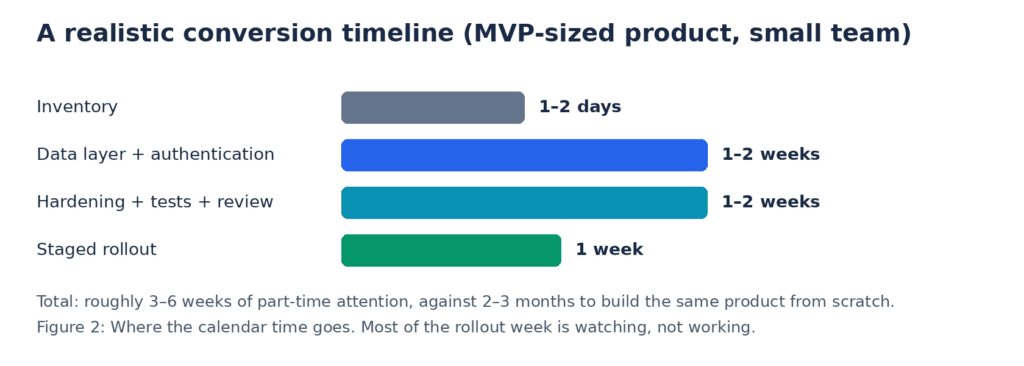
How long the conversion takes
Founders always ask, so here are the ranges I actually see for a typical MVP-sized product. The inventory takes a day or two. The data layer and real authentication together take one to two weeks of focused work. Hardening and the characterization tests take another week, and they overlap with the code review, because the tests are what make the review’s cleanups safe. The staged rollout takes a week of calendar time, most of it watching. Call it three to six weeks of part-time attention for a small team, against the two or three months a from-scratch build of the same product usually runs, and the AI-generated prototype still earns its keep in that comparison: it retired the product risk, the question of whether anyone wanted the thing, before the team spent the engineering money. What blows the schedule up is never the steps. It is discovering in week four that the pretense list was longer than the feature list, which is why the inventory comes first and why nobody is allowed to skip it. It is also worth saying what the conversion does not require: a feature freeze on the business itself. Sales keep selling, the demo keeps demoing, and the converted system replaces the prototype at the end, not the beginning.
When the right answer is a rewrite
Sometimes the inventory from step 1 ends the discussion. I advise keeping the AI-generated prototype as the specification and rewriting the core when several of these hold:
- The data model contradicts the business (not just loose, but wrong: orders that cannot represent refunds, users who cannot belong to two organizations).
- The pretense list is longer than the feature list, so there is less working software than the demo suggests.
- The code is one indivisible generated artifact, where changing anything anywhere breaks something elsewhere, and no test can be attached to a part.
- The stack itself is the problem: an unmaintained framework, or a builder’s proprietary runtime you cannot self-host.
A rewrite from a working prototype is not the disaster a rewrite from a running business is. You hold the specification in your hands, it demos, and the team finally knows which parts users loved. Budget it as building the product with the world’s most detailed requirements document, because that is what the prototype became.
Conclusion
The conversion, on one page. Freeze the AI-generated prototype and inventory what it does, what it pretends, and what it depends on. Rebuild the data layer on constraints and migrations. Replace the costume login with real authentication and server-side authorization. Harden inputs, errors, and secrets. Pin the behavior with characterization tests while you consolidate the code. Review the dependencies and govern the agents that will keep writing code in the repo. Ship in stages, with logs, metrics, and a rehearsed rollback. And when the inventory says the core is wrong, keep the prototype as the specification and rewrite without guilt.
The founders who do this well share one trait: they never believed the demo was the product, so the conversion is a plan rather than a betrayal. The AI-generated prototype did its job, which was to make the idea testable in days. Production is a different job, and it is mostly made of the unglamorous properties in that table.
If you would rather not start from a raw prototype at all, that is the problem Flatlogic’s generator is built to solve: it produces a full-stack application with the database, authentication, and roles already structured, so part of this conversion is done before you start. And if your team is choosing among the current crop of AI builders, Flatlogic’s comparison of Lovable, Bolt, and Replit (https://flatlogic.com/blog/lovable-vs-bolt-vs-replit-which-ai-app-coding-tool-is-best/) is a fair map of what each one hands you. Either way, start from the inventory. The demo always works. Your job is to make the software deserve the demo.
Comments