


TL;DR
- Web app builds typically cost $5,000–$300,000+; most SMB/startup MVPs land around $20,000–$100,000.
- Scope (workflows, roles, integrations, data, scalability) is the #1 cost driver, not a simple feature list.
- Use a 5-factor scope check to map projects to $20K–$50K, $50K–$120K, or $120K–$250K+ ranges.
- Budget beyond coding: discovery, design, QA, deployment, and maintenance can be ~45–80% of total cost.
- Pre-built foundations (auth, CRUD, admin) can reduce uncertainty, shorten timelines, and prevent costly rework.
Fact Box
- The article says web app costs typically range from $5,000 to $300,000+ depending on scope and complexity.
- It states simple MVPs cost $5,000–$50,000 and take 1–3 months to build.
- It states mid-level apps cost $50,000–$150,000 with a 3–6 month timeline.
- It states complex apps cost $150,000–$300,000+ and take 6–12+ months.
- The article claims the global web development market exceeded $70B in 2024.
What if you could estimate your web app budget before writing a single line of code, and avoid the costly mistakes that sink most startups?
When founders and SMB owners search for “how much does a web app cost”, they’re usually asking:
- How much will my idea cost to build?
- What drives the price up or down?
- Can I estimate costs without talking to developers yet?
- How do I avoid overpaying or underbuilding?
As Marc Andreessen famously said: “Software is eating the world”. That also means: software budgets are becoming one of the most critical decisions businesses make.
The challenge is real and expensive. The global web development market exceeded $70 billion in 2024 and continues to grow rapidly, reflecting massive demand for digital products. At the same time, web app costs vary wildly, from $15,000 for simple tools to $250,000+ for complex platforms. This unpredictability creates a serious problem for startups and SMBs, especially when 42% of startups fail due to building the wrong product or misallocating resources. Without a structured way to estimate costs, businesses risk overspending, under-scoping, or delaying launch.
By reading this article, you’ll learn how web app costs actually break down with real numbers, what “scope” truly means and why it’s the number one cost driver, how to use a practical scope-based calculator right away, how to estimate your project budget before even talking to vendors, and proven ways SMBs and startups can reduce costs without sacrificing quality.
How Much Does a Web App Cost? (Quick Answer)
If you’re looking for a fast, realistic estimate, the cost of building a web application typically ranges anywhere from $5,000 to $300,000+. That’s a huge gap, and it exists because web apps are not standardized products. Every project differs in scope, complexity, and business goals.
For SMBs and startups, most projects fall into three practical tiers: simple MVPs, mid-level applications, and complex platforms. Each tier reflects not just the number of features, but how sophisticated those features are, how they interact, and how scalable the system needs to be. 
Cost by Complexity Level
| Complexity Level | Estimated Cost | Timeline | Best For | Typical Features |
| Simple (MVP) | $5,000 – $50,000 | 1-3 months | Early-stage startups, SMB tools | Basic authentication, simple dashboard, and CRUD functionality |
| Mid-Level App | $50,000 – $150,000 | 3-6 months | Growing startups, SaaS MVPs | Multiple user roles, integrations, payments, and dashboards |
| Complex App | $150,000 – $300,000+ | 6-12+ months | Scalable SaaS, enterprise solutions | Advanced workflows, real-time features, analytics, and high scalability |
These ranges assume a standard development process including design, development, and testing. However, they can shift significantly depending on team location, tech stack, and project requirements.
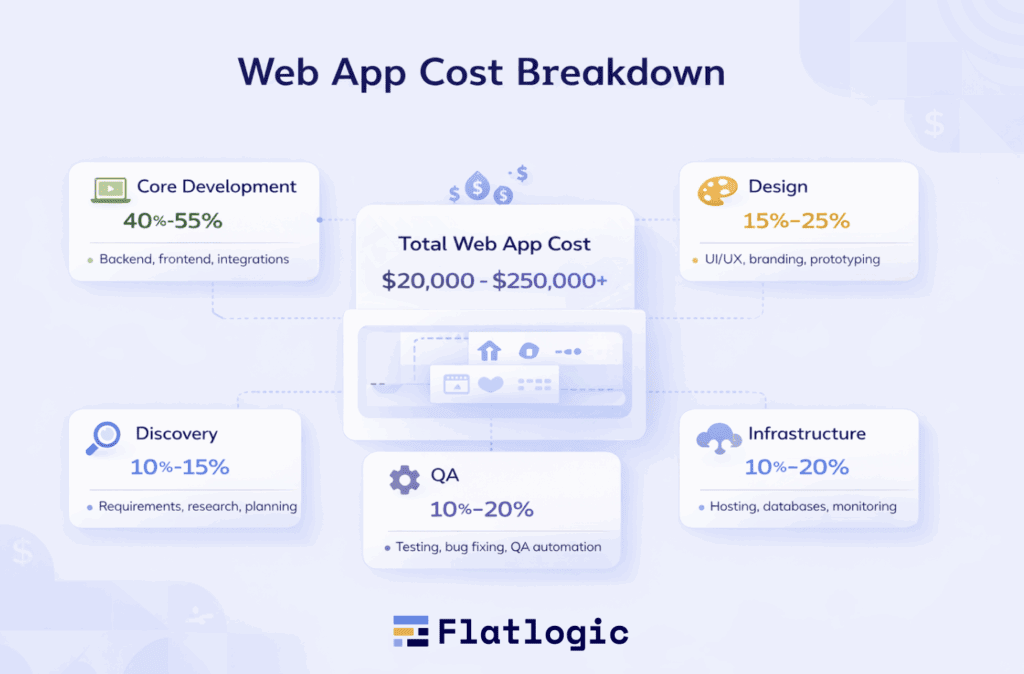
Cost Breakdown by Development Stage
To understand where your budget actually goes, it helps to break the cost into stages:
| Stage | % of Total Cost | What’s Included |
| Discovery & Planning | 10-15% | Requirements, research, technical architecture |
| UI/UX Design | 15-25% | Wireframes, prototypes, user flows |
| Development | 40-55% | Frontend + backend coding |
| Testing & QA | 10-20% | Bug fixing, performance testing |
| Deployment & Maintenance | 10-20% | Hosting, monitoring, updates |
Many founders underestimate everything outside of development, but these stages are critical to building a reliable product.
Cost by Feature Scope
Another way to quickly estimate your budget is by looking at feature scope:
| Feature Scope | Cost Impact | Example |
| Basic Features | Low | Login, profile management, simple dashboard |
| Moderate Features | Medium | Payments, search, notifications, and user roles |
| Advanced Features | High | Real-time updates, AI, complex integrations |
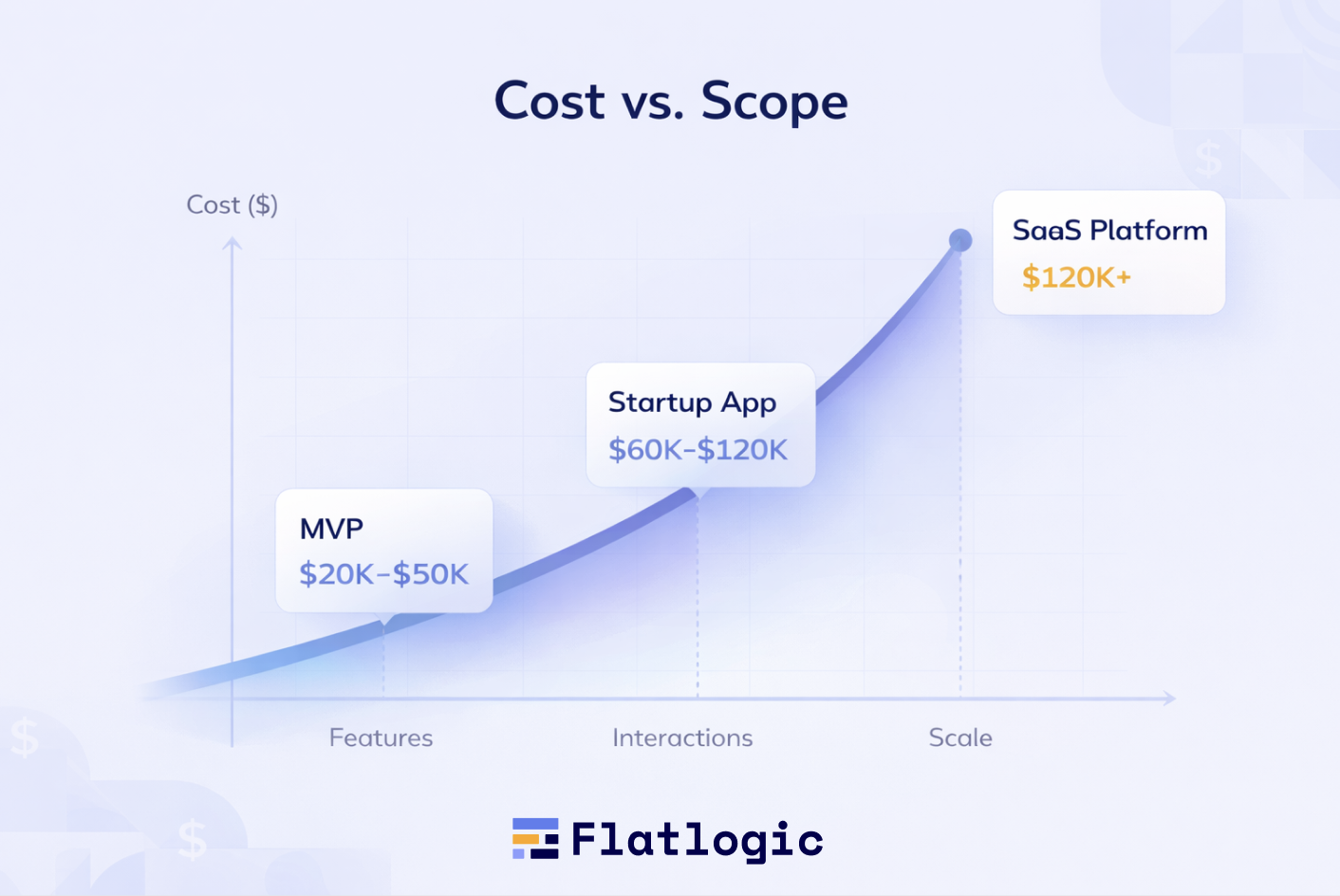
The key insight here is that features don’t add cost linearly. A few advanced features can double or even triple your budget because of the complexity they introduce.
Quick Reality Check
If you’re building:
- A simple internal tool → expect $10K-$40K
- A startup MVP → expect $40K-$120K
- A scalable SaaS product → expect $120K-$250K+
These ranges are not arbitrary, they reflect how scope expands from a single use case to a full product ecosystem.
Why There’s No “Average” Cost
There’s no meaningful “average” price for a web app because:
- Two apps with the same features can differ in complexity
- Integrations and edge cases dramatically increase effort
- Scalability requirements change architecture decisions
- Design quality and user experience impact development time
That’s why asking “How much does a web app cost?” without defining scope will always lead to vague answers.
A web app can cost anywhere from a few thousand dollars to several hundred thousand, but for most SMBs and startups, a realistic starting point is: $20,000 to $100,000 for a solid, usable MVP
From there, your budget grows as your product evolves. The key isn’t guessing the cost, it’s understanding what drives it. And that starts with scope.
Why Scope Matters More Than Features
When estimating the cost of a web app, most founders start by listing features, login, dashboard, payments, and so on. But features alone don’t determine the price. What really drives cost is scope, meaning how those features are built, connected, and scaled.
For example, a “login system” can be very simple, or it can include social authentication, multi-factor security, user roles, and permission layers. A “dashboard” might display static data, or it could require real-time updates, filtering, and complex analytics. On paper, the features look the same, but the scope, and therefore the cost, is completely different.
Scope also includes things that are easy to overlook: edge cases, integrations, data structure, and future scalability. As soon as your app needs to handle multiple user types, connect to external services, or support growth, complexity increases quickly.
That’s why two apps with similar feature lists can have dramatically different budgets. Features describe what your app does, but scope defines how complex it is to build. And in web development, complexity is what you’re really paying for.
The Scope-Based Cost Calculator (Core Framework)
Instead of guessing your web app budget, you can estimate it more reliably by breaking your project down into key scope dimensions. This approach helps you move from vague ideas to a structured cost model based on what actually drives development effort.
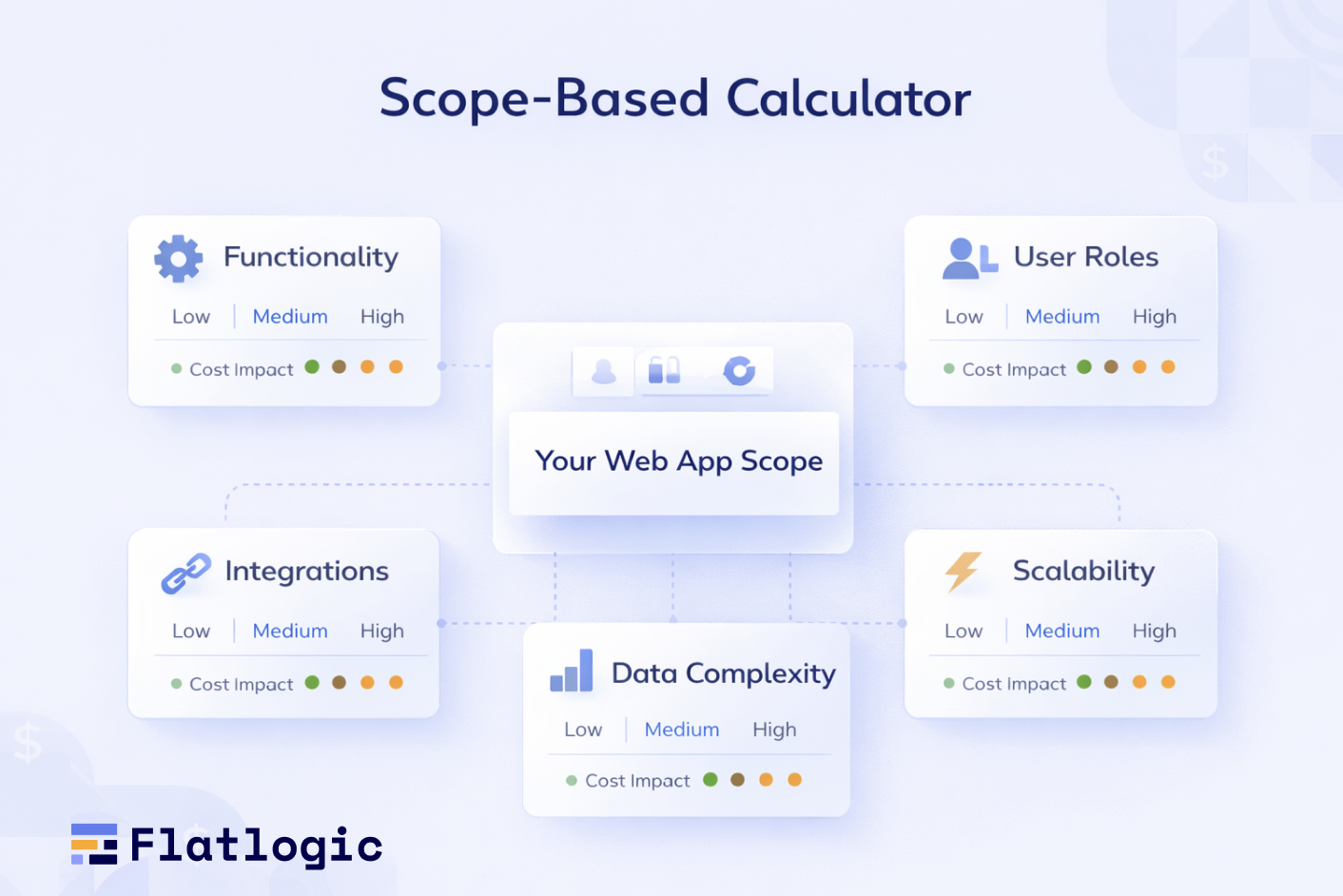
At its core, a scope-based calculator evaluates five factors: functionality, user roles, integrations, data complexity, and scalability. Each of these adds layers of effort and cost to your project.
Core Functionality
This defines what your app actually does and how many workflows it supports.
| Level | Description | Cost Impact |
| Basic | One or two simple workflows | Low |
| Moderate | Multiple user journeys and interactions | Medium |
| Advanced | Complex logic, automation, dynamic processes | High |
The more interconnected your workflows are, the more development time is required.
User Roles & Permissions
Each additional role increases both backend logic and frontend complexity.
| Number of Roles | Example | Cost Impact |
| 1-2 roles | User + Admin | Low |
| 3-5 roles | Manager, Vendor, Support | Medium |
| 5+ roles | Enterprise-level systems | High |
Permissions, access control, and role-based views quickly expand scope.
Integrations
Most modern web apps rely on third-party services, and each integration adds development and maintenance overhead.
| Integration Type | Examples | Cost Impact |
| None / Minimal | Standalone app | Low |
| Standard | Payments, email services, analytics | Medium |
| Advanced | Multiple APIs, CRMs, external platforms | High |
Even “simple” integrations like payments can become complex when subscriptions or refunds are involved.
Data & System Complexity
How your app stores, processes, and displays data significantly affects cost.
| Data Complexity | Description | Cost Impact |
| Simple | Basic CRUD operations | Low |
| Moderate | Relational data, filtering, reporting | Medium |
| Advanced | Real-time data, large datasets, AI features | High |
As data relationships grow, so does the need for more sophisticated architecture.
Performance & Scalability
Planning for growth increases upfront cost but prevents expensive rebuilds later.
| Scale Requirement | Description | Cost Impact |
| Small | Limited users, minimal traffic | Low |
| Growing | Expected user growth, moderate load | Medium |
| High Scale | Large user base, high availability, real-time performance | High |
Scalability affects infrastructure, backend design, and optimization efforts.
Putting It All Together
Once you assess each dimension, you can combine them into a rough estimate:
| Scope Level | Estimated Cost Range |
| Mostly Low | $20K – $50K |
| Mixed (Low + Medium) | $50K – $120K |
| Mostly Medium + High | $120K – $250K+ |
This framework doesn’t give you an exact number, but it gives you something more valuable: a clear, structured way to understand where your budget is going and why.
Instead of relying on guesswork, you’re now estimating based on the real drivers of development cost.
Why Flatlogic Is the Best Solution for Cost-Efficient Web App Development
Flatlogic addresses the core problem behind unpredictable web app costs: lack of structure. Instead of starting from scratch, it provides a clear, standardized foundation that reduces complexity, speeds up development, and makes costs more predictable.
Pre-Built Architecture
Flatlogic generates production-ready applications with a structured backend, database, and admin panel.
What this means:
- No need to design architecture from zero
- Faster project setup
- Fewer technical mistakes early on
Impact on cost: Reduces initial development time and eliminates expensive rework.
Faster Time to Market
Instead of spending weeks on boilerplate setup, teams can immediately focus on core business logic.
What this means:
- Launch MVPs быстрее
- Validate ideas earlier
- Iterate based on real user feedback
Impact on cost: Shorter development cycles = lower overall budget.
Reduced Scope Uncertainty
Flatlogic standardizes common features like authentication, CRUD operations, and admin dashboards.
What this means:
- Less ambiguity in estimates
- Fewer unexpected technical challenges
- More predictable timelines
Impact on cost: Minimizes budget overruns caused by unclear scope.
Built-In Scalability
Applications are generated with best practices in mind, making them easier to extend as your product grows.
What this means:
- No need for major rewrites later
- Easier integration of new features
- Better long-term performance
Impact on cost: Prevents expensive rebuilds as your user base grows.
Focus on What Matters
By removing repetitive development work, Flatlogic lets teams concentrate on unique features and business value.
What this means:
- More time for product differentiation
- Better user experience
- Higher ROI on development effort
Impact on cost: You invest only in features that directly impact your business.
Flatlogic isn’t just a development tool, it’s a structured approach to building web apps. By reducing uncertainty, accelerating development, and standardizing key components, it helps SMBs and startups build faster, spend smarter, and scale with confidence.
Real Examples (Scope → Cost)
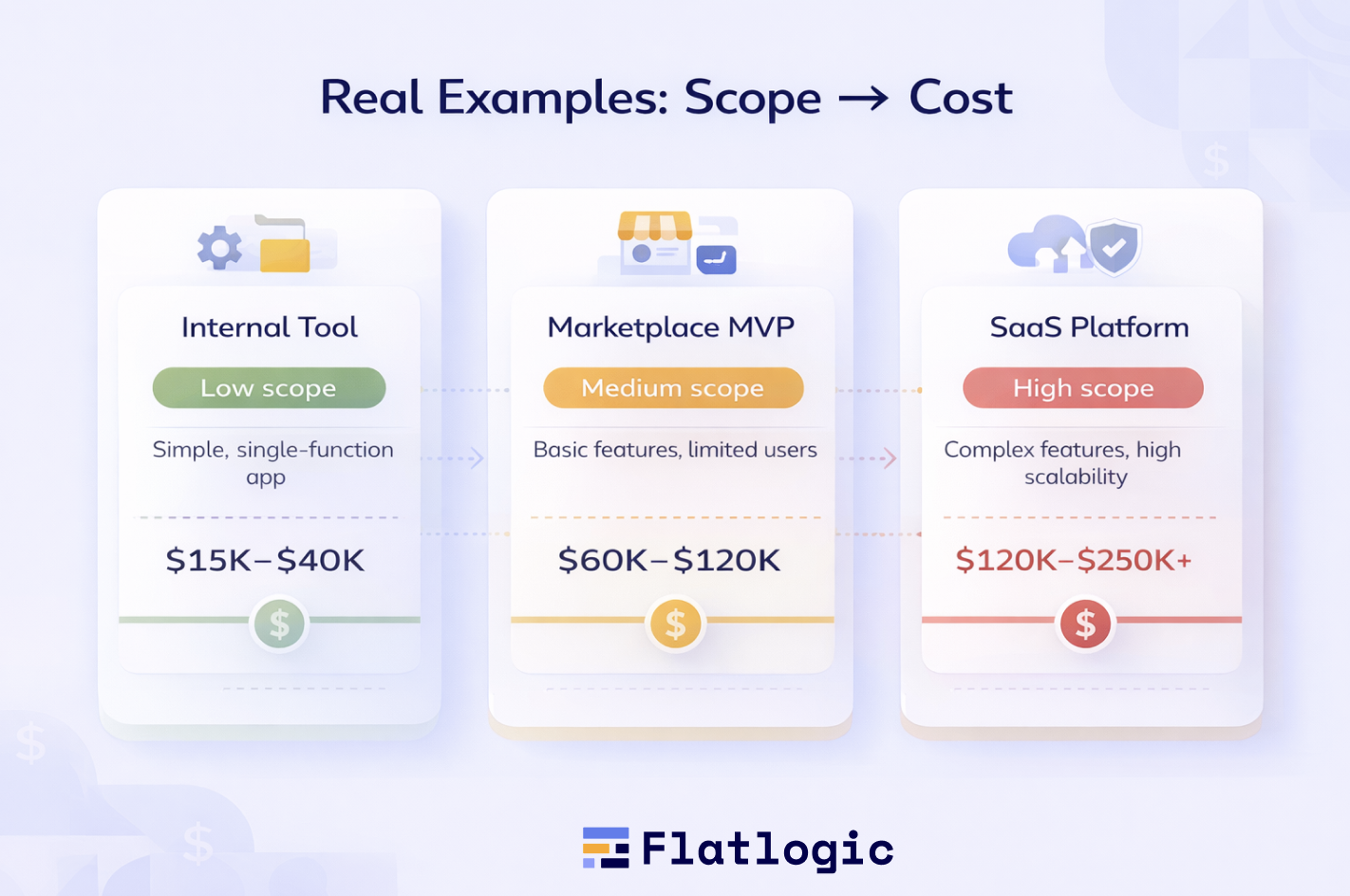
To make cost estimation more tangible, let’s look at how different levels of scope translate into real budgets. These examples show how cost grows not just with features, but with complexity.
Example 1: Internal Tool for an SMB
Imagine a small internal system for managing tasks, inventory, or simple workflows. The app has one main purpose, limited user roles (for example, employees and an admin), and little to no integrations.
| Key Scope Factors | Level |
| Functionality | Basic |
| User Roles | 1-2 |
| Integrations | Minimal |
| Complexity | Low |
Estimated Cost: $15K – $40K
Because the scope is narrow and predictable, this type of app is relatively fast and affordable to build.
Example 2: Marketplace MVP
Now consider a startup building a marketplace where two types of users interact, such as buyers and sellers. This introduces multiple workflows, user roles, and payment functionality.
| Key Scope Factors | Level |
| Functionality | Moderate |
| User Roles | 3-4 |
| Integrations | Payments, notifications |
| Complexity | Medium |
Estimated Cost: $60K – $120K
The cost increases due to user interactions, transaction logic, and more structured data handling.
Example 3: SaaS Platform
Finally, a full SaaS product designed for scale includes advanced workflows, subscriptions, analytics, and integrations with third-party tools. It also needs to support many users reliably.
| Key Scope Factors | Level |
| Functionality | Advanced |
| User Roles | Multiple |
| Integrations | Extensive |
| Complexity | High |
Estimated Cost: $120K – $250K+
Here, the investment reflects not just building features, but designing a system that can grow, scale, and remain stable over time.
What This Means in Practice
Across these examples, the pattern is clear: costs rise as your app moves from a single-purpose tool to a multi-user, scalable platform. The biggest jumps happen when you introduce interactions between users, external integrations, and more advanced data handling.
This is why two apps with similar feature lists can have completely different budgets, because their scope, not just their features, defines the real cost.
Hidden Costs Most Founders Miss
When estimating a web app budget, most founders focus almost entirely on development. But writing code is only one part of the total cost. In reality, a significant portion of your budget goes to activities that happen before, around, and after development, and overlooking them is one of the main reasons projects go over budget.
One of the first hidden costs is discovery and planning. Before any code is written, teams need to define requirements, map user flows, and design system architecture. Skipping this step often leads to costly rework later, when assumptions turn out to be wrong.
Another major cost comes from UI/UX design. A well-designed interface isn’t just about aesthetics, it directly impacts usability and development complexity. Creating wireframes, prototypes, and testing user experience takes time, but it prevents expensive changes after development has started.
Testing and quality assurance are other areas founders tend to underestimate. Every feature needs to be tested across devices, edge cases need to be handled, and bugs need to be fixed. The more complex your app, the more time QA requires, and the more critical it becomes.
Then there’s infrastructure and deployment. Hosting, databases, cloud services, and monitoring tools all add ongoing costs. Even a simple app requires a stable environment to run, and scaling that environment as your user base grows increases expenses over time.
Finally, maintenance and updates are unavoidable. After launch, your app will need security updates, performance improvements, bug fixes, and potentially new features. Many teams allocate little to no budget for this, even though it’s essential for keeping the product functional and competitive.
The key takeaway is that development is only part of the investment. A realistic budget accounts for the entire lifecycle of the product, from idea to launch and beyond. Ignoring these hidden costs doesn’t make them disappear; it just means you’ll pay for them later, often at a higher price.
How SMBs and Startups Reduce Costs
For SMBs and startups, controlling development costs isn’t about choosing the cheapest option, it’s about making smarter decisions early. The most successful teams reduce costs by managing scope, prioritizing effectively, and avoiding unnecessary complexity.
One of the most effective strategies is starting with an MVP (Minimum Viable Product). Instead of building a full-featured product from day one, you focus on solving a single core problem. This allows you to launch faster, validate your idea, and avoid investing in features that users may not need.
Another key approach is leveraging pre-built solutions and frameworks. Many common features, such as authentication, payments, and admin dashboards, don’t need to be built from scratch. Using existing components significantly reduces both development time and cost while improving reliability.
Cost-conscious teams also practice strict prioritization. Every feature should be evaluated based on its real value to users. By separating “must-have” functionality from “nice-to-have” ideas, you prevent scope from expanding unnecessarily, which is one of the biggest drivers of budget overruns.
Choosing the right technology stack and development approach also plays a major role. Some technologies enable faster development and easier maintenance, which lowers both initial and long-term costs. Similarly, making decisions with scalability in mind helps avoid expensive rebuilds later.
Finally, the most important cost-saving factor is having a clear, structured estimation process. When you understand how scope affects cost, you can plan more accurately, avoid surprises, and allocate your budget where it matters most.
In the end, reducing costs isn’t about cutting corners, it’s about building only what you truly need, when you need it, and doing it in the most efficient way possible.
Why Traditional Estimates Fail
Traditional web app cost estimates often break down because they focus on surface-level details instead of the underlying complexity. Without a structured approach, they create a false sense of clarity while hiding the real cost drivers.
Feature-Based Thinking Instead of Scope-Based Thinking
Most estimates start with a list of features like “login,” “dashboard,” or “payments.” But features don’t define effort, scope does. The same feature can be simple or highly complex, depending on requirements, which makes early estimates unreliable.
Missing Technical Depth
Initial estimates rarely account for:
- Edge cases
- Error handling
- Security requirements
- Performance optimization
These elements are essential for a production-ready app, but they’re often discovered later, when changing things becomes more expensive.
Underestimating Integrations
Third-party services (payments, APIs, CRMs) are often treated as “quick add-ons,” but in reality they require:
- Custom implementation
- Testing
- Ongoing maintenance
Each integration introduces uncertainty that traditional estimates fail to capture.
Ignoring Real-World Usage
Apps don’t operate in ideal conditions. Users behave unpredictably, data grows, and systems need to handle load. Traditional estimates rarely include the effort required to make an app stable under real conditions.
No Consideration for Scalability
Many estimates assume a small user base and don’t factor in future growth. As a result, systems need to be reworked later, leading to higher long-term costs.
The Core Problem
At the heart of it, traditional estimates fail because they are not structured. They rely on assumptions instead of breaking the project into measurable components.
A scope-based approach solves this by:
- Defining complexity upfront
- Accounting for technical depth
- Connecting requirements to real cost drivers
Without that structure, any estimate is just a rough guess, and often an expensive one.
Conclusion
Estimating the cost of a web app isn’t about finding a single number, it’s about understanding the factors that shape that number. As you’ve seen, the biggest driver isn’t just the list of features, but the scope behind them: how complex your workflows are, how users interact, how data is handled, and how the system is expected to grow.
By shifting from vague, feature-based thinking to a structured, scope-based approach, you gain control over your budget and reduce the risk of unexpected costs. This allows you to make smarter decisions, prioritize effectively, and build products that align with both your goals and your resources.
If you want to simplify this process and accelerate development, platforms like Flatlogic can help you generate production-ready web apps with built-in architecture, reducing both time and cost.
In the end, successful web app development isn’t about spending less, it’s about investing wisely, starting with the right scope, and building step by step with clarity and confidence.