


TL;DR
- A customer portal is a promise your business remembers every conversation; design the system of record first, screens second.
- Build in 7 steps: map truth sources, model one record, set roles, connect payments/comms, add self-service, add guarded automation, drive adoption.
- Guardrails that prevented failures: one outbound msg per client until reply, read live balances at send time, never repeat asked questions, route risky cases to humans.
- Version-one priorities: secure login/RBAC, unified message thread, documents, invoices/payments, and forms; add mobile apps and AI replies later.
- Choose buy vs build vs generate based on workflow fit, control, and speed; generating a codebase you own can accelerate v1.
Fact Box
- Before rebuilding, clients were texting 27 different phone lines with no single conversation view.
- Sinch’s 2025 research: 81% of consumers react negatively to repeating info in support; 42% call it frustrating.
- Genesys: 97% of consumers expect to switch channels without repeating themselves; only 16% of CX leaders say they deliver this.
- Off-hours replies took about 3.9× longer than business-hours replies before the AI agent was introduced.
- Portal rollout included training more than 50 contractors to use the staff and client apps.
When I started rebuilding my company’s systems, our clients were texting 27 different phone lines, and not one person on my team could see a whole conversation. Building a customer portal fixed that, and this is how I did it.
If you are reading this, you are probably asking some version of the same questions I asked. Do I really need a customer portal, or would a better inbox fix the problem? Should I buy one off the shelf or build my own? Which features matter on day one, and which can wait? And how do I keep automation inside the portal from embarrassing me in front of a client? Paul Graham gave the best short answer to why this matters in his essay Do Things That Don’t Scale (July 2013): “You should take extraordinary measures not just to acquire users, but also to make them happy.” A good portal is one of the few ways a small team can keep doing that after it grows.
The problem is bigger than most owners admit. In Sinch’s 2025 State of Customer Communications research, 81% of consumers reported a negative reaction to repeating information when dealing with support, with 42% calling it frustrating and 24% saying it wastes their time (full Sinch report, PDF). Genesys found the same gap from the business side: 97% of consumers surveyed expect to move between channels without repeating themselves, yet only 16% of CX leaders surveyed said their organizations provide fully integrated omnichannel experiences. Customers do not care how many tools you use. They care that you remember what they already told you.
By the end of this guide you will know what a customer portal really is, the 7 steps I followed to build one for a real service business, which features belong in the first version, how to keep automated messages from doubling up, and how to decide between building, buying, and generating your portal.
Terminology: What We Mean by a Customer Portal
Here are the terms I use throughout this guide.
| Term | Meaning |
|---|---|
| Customer portal | A secure, logged-in website or app where a customer sees their own account, documents, payments, and messages with your business. |
| Client portal | Another name for the same idea, common in service businesses such as agencies, law firms, and studios. |
| System of record | The one place that holds the official version of a piece of data, such as a contract status or an invoice balance. |
| Single sign-on (SSO) | One login that works across several apps, such as a web portal and mobile apps. |
| Role-based access control (RBAC) | Rules that decide what each type of user, such as staff, crew, client, or admin, can see and do. |
| Webhook | An automatic message one system sends another when something happens, such as a payment succeeding. |
| Omnichannel | Handling customer conversations across text, email, phone, and chat as one continuous thread. |
| Self-service | Letting customers find answers, sign documents, and pay without waiting for staff. |

The Main Idea: A Customer Portal Is a Promise About Memory
Most guides describe a customer portal as a list of features: login, documents, payments, chat. Those matter, but they are not the point. The point is a promise to your customer that your business remembers. Whoever answers, on whatever channel, at whatever hour, they see the same history.
That changes how you design it. You do not start with screens. You start with the record that holds the truth, then you decide who gets to see which part of it, and only then do you build the screens.
Diagram: One Record, Three Views
flowchart TB
T[Texts] –> P[(One project record)]
E[Emails] –> P
C[Calls] –> P
S[Stripe payments] –> P
P –> O[Office view: full pipeline]
P –> W[Crew view: assigned shoots only]
P –> K[Client view: own documents, invoices, messages]
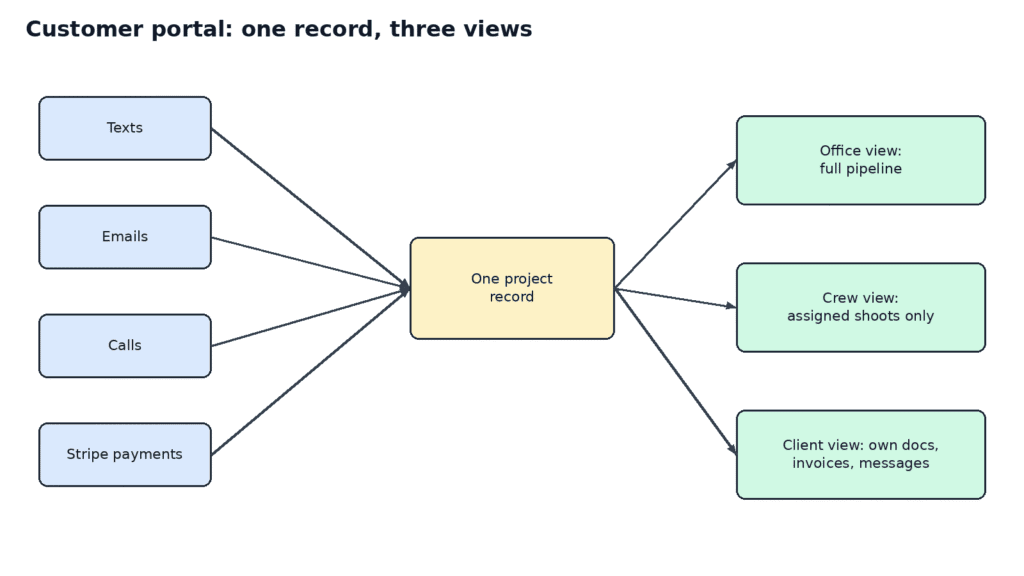
Diagram showing texts, emails, calls, and payments flowing into one project record with office, crew, and client views
Figure 1. Every channel writes to one project record, and each role sees only its own slice.
How to Build a Customer Portal in 7 Steps
These are the 7 steps I followed. I wrote them for owners of service businesses and SaaS founders alike, because the logic is the same whether your customer is a bride or a software buyer.
Step 1: Find Where the Truth Lives Today
Before writing any code, I listed every place a customer could reach us and every place a booking’s status was stored. That is how we found the 27 phone lines. It was uncomfortable, and it was the most useful exercise of the whole project.
Do the same exercise. Write down every phone number, inbox, chat widget, form, and spreadsheet. Then write down every app or automation that can send a message to a customer. You will almost certainly find more than you expected.
Step 2: Design One Record Around the Real Job
Generic tools are built around generic objects such as contacts and deals. Our work is built around an event. So the central object in our system is a project, and everything hangs off it: people, dates, crew, documents, payments, and messages.
For a SaaS business, your central object might be an account or a workspace. Pick the object your customers actually think in. If your data model matches how customers describe their own problem, the portal almost designs itself.
Step 3: Decide Who Sees What
We have three main audiences. The office works the whole pipeline. Crew members see only the shoots they are assigned to. Clients see their own documents, invoices, and messages. We use Keycloak single sign-on, so one login works for the portal and for both mobile apps, and roles decide what each person can open.
| Role | Can see | Cannot see |
|---|---|---|
| Office staff | Full pipeline, all projects, payments | Nothing restricted by role |
| Crew member | Assigned shoots, timelines, upload folders | Other clients, pricing, invoices |
| Client | Own contract, invoices, questionnaire, gallery, messages | Other clients, internal notes |
| Admin | Everything, plus settings and permissions | Nothing |
Step 4: Connect Payments, Books, and Phone Lines to the Same Record
A customer portal that shows a stale balance is worse than no portal. Our payments run through Stripe, our books through QuickBooks, and our phone lines through Twilio, and all three write to the same project. Nobody copies a status from one tool to another by hand.
I learned how important this is the hard way. On 08/12/2026, an automated collections message went out for an invoice that the portal already showed as paid. The automation was reading an old campaign snapshot instead of the live balance. The same day, we shut off that job, required the amount due to be read right before every send, and added a nightly check of open invoices against Stripe.
Step 5: Give Customers Real Self-Service
The best features are the ones that save the customer a message. In our portal and client app, couples can open their contract and invoices, fill out their questionnaire, message us on the same thread, and browse, favorite, download, and share their galleries. Films are reviewed with comments pinned to the exact second, each revision becomes a new version, and approval unlocks the download.
Self-service also reflects how we sell. Candid Studios bills by the hour, never sells subscriptions, and includes both the RAW files and a final gallery with every delivery. The portal makes that visible to the couple instead of leaving it buried in an email thread. You can see how we present it on our pricing page.
Step 6: Put Automation on the Record, With Guardrails
This is where most of my mistakes happened, so I will be specific about what went wrong inside our customer portal.
In July 2026, on the first day our AI sales agent replied on live threads, a client got two answers within minutes. A teammate had already answered from a shared mailbox the agent could not see. The model was not the problem. I had given the agent an incomplete picture and let it act anyway.
In August 2026, it happened again in a different form. A night message and a morning message both reached clients who had not replied yet, because two automations had no lock on the same client. Each one acted as if it were the only one talking. I froze only the two paths that had proven they could double up and kept the rest running. Our rule now is one outbound message per client until they reply.
There was a third lesson in October 2026. On 10/12/2026, the sales automation sent three couples the exact follow-up question they had already received on 10/05/2026. It was stopped two minutes later. The fix moves an unanswered check-in to the next approved question, and any question already asked goes to a person instead of being sent again.
Here is the guardrail table I wish I had on day one.
| Guardrail | What it prevents | How we enforce it |
|---|---|---|
| One outbound message per client until reply | Double messages from parallel automations | A lock on the client record before any send |
| Read live data right before sending | Chasing invoices that are already paid | Balance pulled from Stripe at send time |
| Never repeat an asked question | Robotic, repetitive follow-ups | Repeats route to a person |
| Risky cases go to a human | Wrong answers to known contacts or messy threads | Routing rules on the record |
| A test that must always fail | A broken send gate going unnoticed | A fixed test case in the agent’s evaluation set |
I also chose not to put a human approval step on every AI message. Before the agent, our off-hours replies took roughly 3.9 times longer than business-hours replies, and a blanket human gate would have brought that delay right back. Sending only the risky cases to a person was the better trade.
Step 7: Stay Until People Actually Use It
A customer portal nobody opens is just an expensive website. We shipped staff and client apps on iOS and Android with the same login, and I trained more than 50 contractors to use them. Adoption problems show up in small, specific ways. On 10/13/2026, one of our photographers opened his project list and saw “0 active, 10 in your queue” with every column empty, so he could not upload the session he had just shot. He sent a photo of his screen. The same day we found there was no way to reset a crew member’s password from the portal, and we shipped both fixes.
Adoption is not a launch event. It is the slow work of fixing every small thing that makes someone give up and send a text instead.
When the Portal Has to Move Big Files
Many guides skip file delivery, but for a media business it is half the job. One event can produce hundreds of gigabytes of photo and video, and our crews upload from hotels and home connections. Consumer file sharing kept stalling and restarting transfers from zero, and it had no idea which project a folder belonged to.
So we built Candid Cloud, a storage system tied to the same project record, with desktop apps that resume an interrupted transfer from a verified byte instead of starting over. Crew members can reach only their own project folders. Large uploads go straight from the device to storage, and the server only authorizes and finalizes them, so huge files never pass through the app server.
Even then, the real world found gaps. On 10/13/2026, a couple’s RAW wedding video was missing from Candid Cloud, because the editor had sent it as a Dropbox link with 16 clips and 80 GB of footage. There was no way to load footage that arrived outside the desktop app. The team shipped an import tool that runs as a dry run by default and never overwrites a file that already exists at a different size.
Then the import kept dying. A health monitor restarted the job after about 90 seconds, because it was checking the import as if it were a web server, so large clips could never finish. The fix turned that check off only for the one-off import job and left it on for the production API. An automatic safety net can cause the very failure it was built to prevent, so test your guardrails as carefully as your features.
If your product delivers large files, plan for three things early: resumable transfers, project-scoped permissions, and a safe way to bring in files that arrive through the side door.
What I Would Do Differently Next Time
Looking back, I would change the order of a few things, and I think these lessons transfer to almost any business.
First, I would map every sender before connecting any automation. Our double messages were not caused by a bad model or a bad tool. They were caused by two writers that did not know about each other. A one-page list of every app and person that can contact a client would have caught that before a client ever saw it.
Second, I would build the calendar logic with a stable identity from the start. In October 2026, our consultation sync created a fresh Google Calendar invitation every time it ran, even after the meeting had ended. The team reproduced it as three invites for three runs before fixing it. Now each consultation has one stable calendar identity, and picking a time requires an explicit confirmation. Small identity rules like that are cheap on day one and painful to retrofit.
Third, I would give the office a way to price unusual requests inside the record instead of in a side conversation. When a corporate client asked for photo and video coverage but had not decided how many short vertical videos she wanted, the estimate had no way to price them. We added per-piece pricing for reels on top of our hourly coverage. The portal should flex to the request, not force the request into a box.
Finally, I would measure adoption by behavior, not by logins. The question I care about is simple: when a client or a crew member needs something, do they open the app, or do they send a text to a personal number? Every text to a personal number is a small sign that the portal is still missing something.
Diagram: The Customer Portal Message Gate
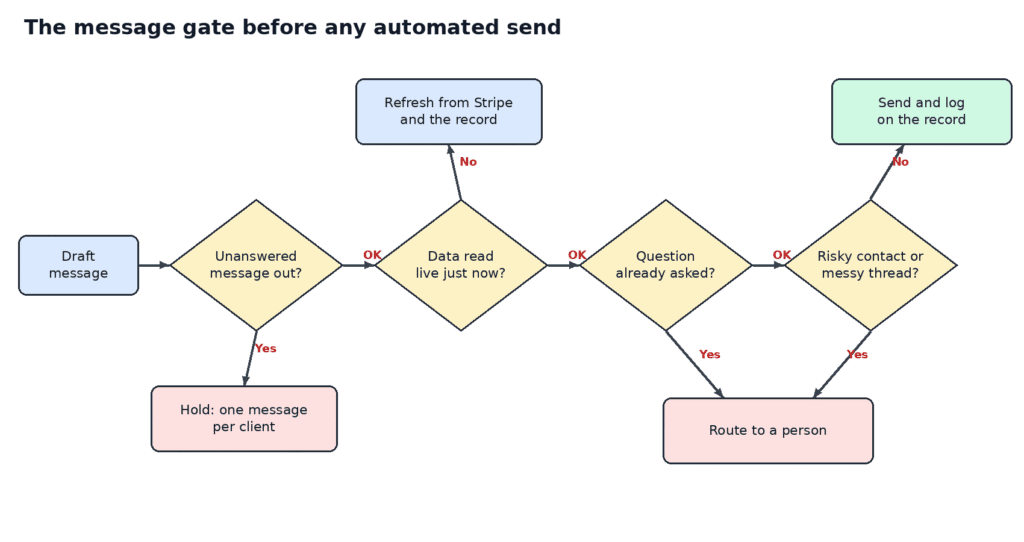
Flowchart of the message gate that checks for a reply lock, live data, and repeated questions before an automated send
Figure 2. Every automated message passes the same gate: one message per client, live data, no repeats, and a person for risky cases.
flowchart LR
A[Draft message] –> B{Client already has an unanswered message?}
B –>|Yes| X[Hold. One message per client]
B –>|No| C{Data read live just now?}
C –>|No| R[Refresh from Stripe and the record]
R –> C
C –>|Yes| D{Question already asked?}
D –>|Yes| H[Route to a person]
D –>|No| E{Risky contact or messy thread?}
E –>|Yes| H
E –>|No| S[Send and log on the record]
Must-Have Customer Portal Features for Version One
If you are deciding what to build first, here is how I would prioritize, based on what our clients and crew actually used.
| Feature | Version one? | Why |
|---|---|---|
| Secure login and roles | Yes | Nothing else is safe without it |
| Unified message thread | Yes | Removes the “which number did I text?” problem |
| Contracts and documents | Yes | Saves the most back-and-forth |
| Invoices and payments | Yes | Customers want to pay without calling |
| Questionnaires and forms | Yes | Replaces long email chains |
| File delivery and galleries | Depends on your business | Essential for us, optional for many SaaS products |
| Mobile apps | Later | A responsive web portal is enough at first |
| AI-drafted replies | Later, with guardrails | Only after the record is complete |
Build, Buy, or Generate Your Customer Portal?
There are three realistic routes. Here is how I would compare them today.
| Route | Best for | Watch out for |
|---|---|---|
| Buy an off-the-shelf portal | Standard workflows that match the tool | Losing details your workflow needs |
| Build from scratch | Unusual workflows, full control | Time, cost, and maintenance |
| Generate a starting codebase | Fast start with code you own | You still have to shape it to your process |
We built our customer portal because nothing on the market fit a multi-day, multi-crew booking. If I were starting again today, I would seriously consider generating the first version instead of writing the basics by hand. Flatlogic Generator will convert this description into a fully functional business web application, with the database, roles, and CRUD screens already in place, and you keep the source code. Flatlogic has a dedicated client portal builder and a custom CRM option for exactly this situation.
For deeper background, Flatlogic’s guides on custom CRM development when off-the-shelf fails and building a custom CRM system step by step cover the decision from a development point of view.
Examples of Successful Customer Portal Solutions
Here are examples you can learn from, starting with the one I know best.
- Candid Studios portal. One project record for each booking, three role-based views, payments and phone lines on the same record, and staff and client apps that share one login. You can see the company it supports at candidstudios.net.
- Back at You by Flatlogic. Flatlogic’s case study on Back at You describes a social CRM for businesses, which is a close cousin of a portal because it centers the customer relationship in one place.
- CiviLaw.Tech by Flatlogic. The CiviLaw.Tech case study describes a document automation CRM for law firms, a good example for anyone whose portal is mainly about documents.
Examples Aligned With Your Business
To make this concrete, here is how the same 7 steps apply to a few different readers.
- A SaaS founder. Your central record is the customer account. Start with billing, plan details, support tickets, and usage on one page. The one-message rule still applies to your onboarding emails and in-app nudges.
- An agency owner. Your central record is the client engagement. Put proposals, approvals, deliverables, and invoices on it, and give each client a login instead of a shared folder link.
- A home services company. Your central record is the job. Crew see only their assigned jobs, customers see appointment times and invoices, and every text from the field lands on the job.
- A clinic or law office. Your central record is the case or patient file, and role-based access matters even more, because privacy rules decide who may see what.
Common Customer Portal Mistakes to Avoid
- Building screens before the record. You end up with a pretty interface that still cannot answer “what did we last tell this client?”
- Letting several tools send messages with no shared lock. This is how our clients got two messages in one night.
- Trusting cached data for anything about money. Always read the live balance right before you send.
- Launching without a training plan. Our photographer’s empty project list was a small bug, and it nearly cost us an upload.
- Adding AI before the history is complete. An agent that cannot see the whole thread will confidently answer the wrong question.
Conclusion: Key Points to Remember
- A customer portal is a promise that your business remembers every conversation, so design the record first and the screens second.
- My 7 steps are: find where the truth lives, design one record around the real job, decide who sees what, connect payments and phone lines, offer real self-service, add automation with guardrails, and stay until people use it.
- The one-outbound-message-per-client rule and live data checks prevent the most embarrassing automation failures.
- Research from Sinch and Genesys shows customers hate repeating themselves, and most businesses still have not connected their channels.
- You can buy, build, or generate a portal, and generating a codebase you own is the fastest way to start without giving up control.
If you are ready to build your own, start with Flatlogic’s client portal builder or the AI web app generator. Describe your customers, your records, and your roles, and let Flatlogic generate a portal you can own and grow. If your process is unusual, as ours was, Flatlogic’s team also offers a free 30-minute consultation to plan a custom build.