


TL;DR
- AI app security is system-wide: secure models plus cloud IAM, APIs, data stores, RAG, tools, and third-party services.
- Apply least privilege to prevent over-agency; define what the AI can do and block high-risk actions like deletions or permission changes.
- Treat prompts, documents, and retrieved web content as untrusted input; harden against prompt injection and validate tool calls.
- RAG security must enforce authorization before data reaches the model; relevance doesn’t equal access rights.
- Bake testing, monitoring, and incident response into the SDLC; watch for abuse-driven outages and runaway inference costs.
Fact Box
- The article cites Bruce Schneier: security is a process, not a product that can be installed.
- It states prompt injection is a primary exposure for LLM and GenAI apps per OWASP 2025 guidance.
- It says NIST SP 800-218A adds AI secure development guidance into the Secure Software Development Framework (SSDF).
- In the internal RAG assistant example, an employee may access 100 documents while thousands of other docs remain restricted.
- The article warns that cloud misconfigurations (e.g., permissive IAM, public storage) can undermine any AI security layer.
The minute that I give my AI-enabled software real users, real data, and real cloud computing resources, it no longer becomes a question of how intelligent the software is, but how secure it can be.
At the initial stages of building an AI-powered app, I concentrate on such elements as the purpose of the application, the most appropriate AI model, the speed of response, and ways to create a convenient user experience. At the time, when the app starts working together with cloud databases, APIs, storage systems, identity platforms, and even other AI services, security issues become no less important. There appear to be a number of dynamic questions to answer: What will happen if the AI is manipulated? Can any confidential data get to people who should not have access to it? Is the AI agent provided with too many privileges?
As has been well known by security specialist Bruce Schneier, security is not a product which could be installed but a process. This idea is particularly important for AI-enabled solutions since security must be constantly evolving along with application code, data, cloud infrastructure, AI models, APIs, and interactions with users. The problem becomes more difficult as current AI-powered applications involve a number of technological solutions such as frontend applications, backend services, cloud storage, databases, APIs, authentication services, third-party libraries, search engines, vector databases, plugins, and bots. Security boundaries and attack vectors appear at each point. According to IBM’s research conducted, most companies facing security problems connected with AI applications were failing to manage AI access controls and governance. In this guide, I am going to cover security threats related to AI applications, define core concepts, give examples, and consider integration of security into the development and deployment process.
How Do AI-Enabled Applications Affect the Security Equation?
When developing a conventional application, I pay attention to well-known security elements like source code, databases, APIs, authentication, servers, network connections, and user accounts. However, with AI, there is another dimension, as applications are capable of analyzing commands, finding information, creating content, and interacting with third-party software.
While traditional software executes static instructions, AI-based software is capable of generating dynamic responses, which necessitates extra security measures. For instance, an internal AI helper will be able to analyze the company’s documents and create support tickets.

The simple workflow looks like:
Employee → AI Assistant → Company Documents → Support Ticket
The real architecture may look more like:
Employee → Web Application → Authentication → API Gateway → AI Model → Retrieval System → Vector Database → Cloud Storage → Business API → Ticketing Platform
In any AI application, each link is a data flow or trust link. Underprivileged permissions, unnecessary AI permissions, or lack of output validation may lead to the leakage of sensitive data, inappropriate action, or unintended action.
Therefore, I approach AI security as a system-wide responsibility rather than a model-only problem, requiring protection across the entire application ecosystem.
AI-Powered App Development: Important Terminology
| Term | Meaning |
| Artificial Intelligence (AI) | Technology that allows software to undertake activities that include reasoning, prediction, classification, generation, or decision-making. |
| Machine Learning (ML) | Refers to a field of AI where computers learn to detect patterns in data in order to conclude. |
| Generative AI (GenAI) | Refers to an AI that can produce content such as text, audio, images, or code. |
| Large Language Model (LLM) | Refers to a machine learning algorithm that can understand natural language. |
| Application Programming Interface (API) | Interface for communication between various software programs. |
| Cloud Security | Various methods to secure the cloud architecture, apps, identity, workload, and data. |
| Identity and Access Management (IAM) | Methods of controlling who and what has access to systems and what they can do. |
| Multi-Factor Authentication (MFA) | Authentication that needs multiple forms of verification. |
| Retrieval-Augmented Generation (RAG) | It is a retrieval-based architecture where external data is retrieved and provided as context to the AI model. |
| Vector Database | A vector database is one that stores and searches the numerical representation of data. |
| Embedding | The numerical representation of data used for detecting semantic connections between pieces of information. |
| Prompt Injection | This refers to an attack where the attacker tries to manipulate the AI model using conflicting instructions. |
| DevSecOps | A method of integrating security within the entire development and operations process. |
| Principle of Least Privilege | The provision of necessary privileges only for the performance of specific functions. |
| Security Information and Event Management (SIEM) | Tools for collecting and analyzing security events and logs. |
All these terms are interrelated. Knowledge of these terms allows us to realize how AI security and cloud security become more similar.
The Main Idea: AI Security Is Also Cloud Security
The problem of AI security is generally addressed exclusively at the level of models, but the reality is that there are many aspects to consider for a production application scenario. Models need cloud infrastructure, databases, storage, API, authentication mechanisms, and monitoring tools. Thus, securing the model is not sufficient. It is necessary to secure the whole environment of the model.
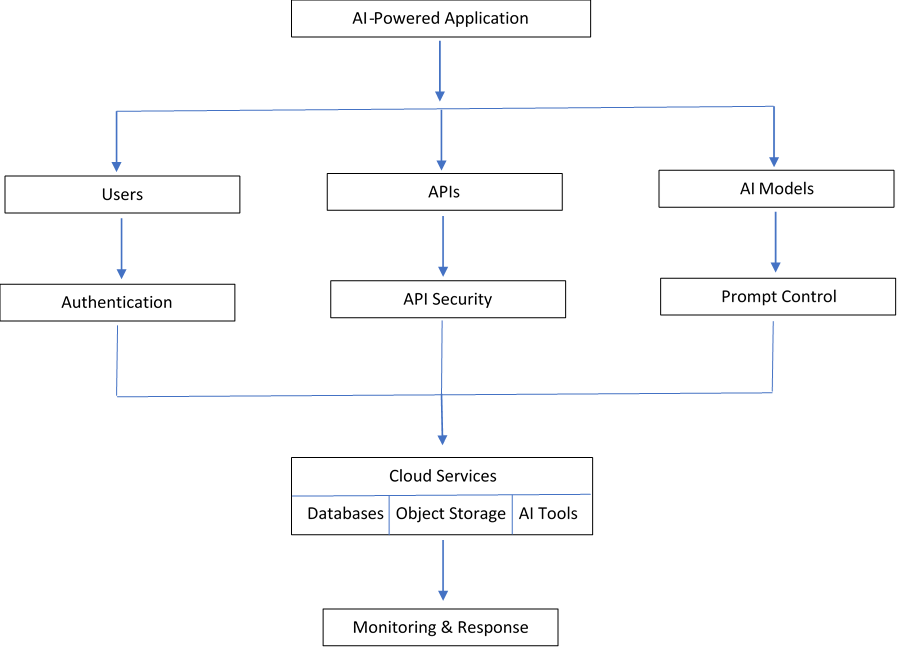
This architecture illustrates the necessity to take care of security in the whole application ecosystem.
Major Security Risks in AI-Powered Applications
Over-permissioned and Over-agency
Another one of the first aspects that I analyze is how much the system can do. While the AI assistant needs to have access to the customer information, it does not necessarily mean that the AI should be able to delete the record, manipulate payments, modify permissions, and allocate cloud resources.
Such a scenario represents the case when the system has too much of something, either functionality, permissions or agency. The internal documents, customer databases, emails, calendar, projects, and financial applications can be accessed by an AI employee assistant.
| AI Function | Appropriate Access | Access to Avoid |
| Search company policies | Read approved documents | Delete documents |
| Create support tickets | Create tickets | Delete all tickets |
| Check calendars | Read availability | Modify executive calendars |
| Generate reports | Read approved datasets | Modify production databases |
| Recommend products | Read catalog | Change product pricing |
It is up to the application to define the AI’s authority and not the other way around.
Prompt Injection and Untrusted Instructions
Prompt injection is possible when someone tries to manipulate an AI-based application with the instructions that contradict the planned function. According to OWASP 2025 guidelines, prompt injection is one of the primary exposures of LLMs and generative-AI applications. For instance, an AI-based assistant used in customer support and programmed with company documents may become a target of malicious prompts to avoid its instructions.
This risk grows with repossessing the content from external sources such as documents with embedded instructions. In my practice, I regard prompts, documents, webpages, and any retrieved content as untrusted input data. The main protections are separation of instructions, validation of the tool’s requests, prevention of sensitive actions, adversarial prompt testing, and observation of behavior. The goal is not to eliminate prompt injection, but to ensure that even if the model is manipulated, attackers cannot cross important security boundaries.
Handling Sensitive Information and RAG Systems
Many AI systems deal with sensitive information, which makes data access control a major security problem. The internal company assistant that is connected to thousands of documents will find the required information for an employee, but without proper authorization, some sensitive documents may get to the AI system.
It means that one should follow the principle that relevance doesn’t mean authorization. In the Retrieval-Augmented Generation (RAG) case, security will include source documents, document processing, embedding models, vector database, retrieval, AI model, and application interface.
I would require authorization before sensitive information reaches the AI model.
Misconfigurations in Cloud: The Simple Risk Behind the Complex Technology
When talking about AI security, people tend to think of complex attacks rather than simple cloud security problems. These could be publicly available storage, overly permissive IAM policies, exposed databases, unprotected APIs, hard-coded credentials, lack of encryption, excessive network exposure, an open administrative console, a too-privileged service account, and an unsecured development environment.
All these security gaps predated AI technology; AI technology magnifies them as it works with customers’ requests, confidential data, source code, proprietary datasets, and business information. That is why any AI security evaluation must include a classic cloud security check. No matter how sophisticated the AI security layer is, an incorrectly configured cloud base is enough to ruin everything.
Security of API in AI Systems
Contemporary AI systems use several APIs where the users interface with the frontend services while the backend interfaces with the AI services; the application then accesses information or takes action using external systems. This creates a chain of trust which needs to be secured with robust authentication, authorization, rate limiting, input/output validation, logging, API gateways, secret management, and abuse detection. The requests from AI need to be subject to similar authorization checks as other application requests. For instance, in case an AI assistant initiates an action like deletion of the user’s account, it will be mandatory for the backend system to determine that it is a genuine action.
AI Third Party and Supply Chain Risks
Current AI uses are very unlikely to rely exclusively on the code written by one group of developers. Rather, they may include foundation models, AI APIs, open-source frameworks, embedding models, vector DBs, clouds, authentication platforms, monitoring tools, plugins, and third-party packages. Every added piece means another piece that needs to be analyzed for security.
The questions I would ask include:
- Who developed/maintains it?
- How often is it updated?
- Are vulnerabilities monitored?
- What kind of information does it process?
- Where does the data go?
- What permissions does it have?
Data Poisoning and Model Integrity
AI relies heavily on data and hence securing the data becomes extremely important. The attacker may tamper with training data, fine-tuning data, retrieval data, etc., that influence the performance of the application. To mitigate the risk, I would have controls over the origin of the data, data validation, access control, change control, versioning, integrity checks, approvals, versioning of models, and recovery from backups. NIST’s specific guide for secure development of AI models adds to the secure software practices by recommending guidelines for AI models in software development. For applications where there is an issue with security, it will be helpful in investigating and resolving the issue.
Uncontrolled Consumption and Abuse of AI Costs
Security concerns do not end at just privacy. There may also be concerns about availability and costs. AI inference may consume a lot of computing power, and attackers can try to exploit this through sending many requests or even complex inputs that can slow down the service and incur costs.
There are ways for me to mitigate this risk, and they include limiting the number of requests, setting rate limits, limiting prompt size and output size, setting user-specific limits, setting budgets, scaling, proper authentication, abuse detection, and the right choice of models. For instance, a simple classification does not need to use the costliest model.
Security Testing During the Development Life Cycle
I would not wait until my software is complete to consider security aspects. SP 800-218A from NIST explicitly includes AI secure development guidelines in the SSDF by addressing issues such as AI model creation and integration into the development life cycle.
A practical workflow looks like this:
| Development Stage | Security Activity |
| Requirements | Identify sensitive data and high-risk functions |
| Architecture | Map trust boundaries and attack surfaces |
| Development | Secure coding and dependency scanning |
| AI Integration | Test prompts, outputs, permissions, and model behavior |
| RAG Development | Test retrieval authorization |
| API Development | Test authentication and authorization |
| Cloud Deployment | Review infrastructure and configuration |
| Pre-Launch | Perform penetration and adversarial testing |
| Production | Monitor access and anomalies |
| Maintenance | Patch, retest, and review changes |
Building an AI Security Threat Model
Before deployment, I ask four basic questions.
What Am I Protecting?
Potential assets include:
- Customer information
- Personal data
- Intellectual property
- Credentials
- Financial information
- AI models
- Prompts
- Training datasets
- Business processes
- Cloud infrastructure
Who Could Attack It?
Potential actors include:
- External attackers
- Malicious users
- Compromised accounts
- Insiders
- Automated bots
- Compromised third-party services
Where Can They Interact With It?
Possible entry points include:
- Web applications
- Mobile applications
- APIs
- File uploads
- Prompts
- RAG documents
- Plugins
- Administrative interfaces
- Cloud infrastructure
What Could Happen?
Potential consequences include:
- Data disclosure
- Account takeover
- Unauthorized transactions
- Service disruption
- Financial losses
- Compliance issues
- Reputational damage
This turns a general security discussion into an actionable architecture exercise.
Monitoring and Incident Response
When the application goes live, I need to be able to monitor the application’s performance through telemetry that includes authentication activities, authorization failures, API calls, odd behaviors, tool usage, data accesses, administrative operations, model failures, configuration changes, cloud resource changes, and dependency issues. It is not important to track every single thing; however, who, what, when, and what happened after it is critical information.
If something goes wrong, the response process should include AI-specific questions:
- Was the model affected?
- Was prompt injection involved?
- Did unauthorized information reach the model?
- Which tools did the AI invoke?
- Which datasets were accessible?
- Were credentials exposed?
- Did generated output trigger an external action?
A practical response sequence is:
Three Practical Examples:
Example 1: AI Customer-Service Assistant
Think of a scenario where I create an AI assistant for an online business store capable of answering customer queries, providing order status, processing refunds, and updating the order shipment details. One of the most vulnerable ways of implementing this technology is to provide unrestricted database and refund access to the AI. The better way of implementing this is to authenticate the customers, get order details, process refunds based on backend policies, limit the value of the refund and log other actions.
Example 2: Internal Knowledge Assistant
Assume that I design a RAG assistant for the company’s staff, which scans through thousands of internal documents. Each individual might be able to access just 100 documents, but the rest of the documents would be restricted. Thus, the retrieval layer needs to factor in any existing policies related to authorization. The AI shouldn’t come across anything just because it is semantically relevant.
Example 3: AI Coding Assistant
Consider a team that uses the AI coding assistant for reviewing repositories and creating code. Although it can help increase the speed of development, there will be greater dangers involved if it has unlimited access to credentials for production systems and deployment infrastructure. I will limit the development and production access levels where the AI can create or change the code, but the process is managed by CI/CD pipelines for testing, security, approval, and deployment.
Cloud Security Market and Use of AI
The use of AI has been growing within the cloud security market as AI systems become more connected to aspects of identity security, application security, data security, threat detection, security posturing, and AI security itself. This is because the use of AI involves interconnected pieces such as models, code, APIs, databases, identities, clouds, and other third-party data. With enterprises moving AI technology from the experimental stage to production, there is more emphasis on making sure that not only AI applications are created but also can be deployed, monitored, maintained, and governed securely at scale. This need is influencing the development of cloud security technology.
Global AI adoption and cloud infrastructure development are also creating different security priorities across regions. North America, Europe, Asia-Pacific, Latin America, Africa, and the Middle East each have different levels of AI maturity, cloud adoption, regulatory requirements, and cybersecurity focus.
A Practical Security-First AI Development Workflow
After considering the major risks, I would organize development around this sequence:
The key here is that this is a cycle and not a single checklist. A new model could be used. A new data source could be connected to the system. The AI agent could be given another tool. A dependency could become vulnerable. The cloud configuration could be changed. And each of these changes calls for another security review.
AI Application Security Checklist
Application
- Validate user input
- Validate AI-generated output
- Scan dependencies
- Protect secrets
- Review authentication
- Review authorization
- Secure APIs
AI
- Test prompt injection
- Test information disclosure
- Review system instructions
- Restrict AI permissions
- Validate tool calls
- Limit autonomous actions
RAG
- Enforce document permissions
- Validate data sources
- Secure ingestion
- Protect vector databases
- Test retrieval isolation
Cloud
- Review IAM
- Apply MFA where appropriate
- Encrypt sensitive data
- Secure storage
- Restrict network access
- Monitor configuration changes
Operations
- Enable security logging
- Configure alerts
- Establish incident response
- Test backups
- Monitor AI usage
- Monitor unusual costs
- Patch systems regularly
Conclusion: Creating Trustworthy AI Applications
As I analyze the scope of creating applications with the help of AI, I note that there is incredible potential in automating processes, speeding up development, providing better user experience, and coming up with new information work models. With all these capabilities, there is a higher responsibility concerning security. AI security is not only about protecting the AI itself but the whole ecosystem around it. The ecosystem consists of components such as application code, APIs, cloud infrastructure, databases, identities, documents, retrieval, vector databases, tools, and even other AI providers. Moreover, the increasing use of AI is contributing to the development of the cloud security market, as businesses need to secure their identity, data, applications, and AI risks. More information regarding the market situation can be found in the analysis of such companies as Pristine Market Insights.
Practical security starts with knowing what the application can access and what actions it can carry out. I have to define my trust boundaries, apply least privilege, secure my APIs and cloud infrastructure, do authorization within my retrieval systems, validate AI-powered actions, secure dependencies, and keep my monitoring and incident response capabilities up and running. Security should be a continual process since my models, plugins, data sets, configuration files, and third-party services may evolve. Frameworks like the NIST AI Risk Management Framework and OWASP guidance on AI security help me handle such risks as prompt injection, exposure of sensitive data, supply chain issues, excessive agency, vectors, and unbounded consumption.
Templates give options for building personalized applications for businesses that would accelerate their development process using AI-driven solutions. In essence, there is one thing I always consider: fast development but no room for excessive access, data flow or AI behavior that might be unmanageable due to the development process. This does not mean that the goal is achieving zero risk; it is about the constant security process.
Conclusion: Key Takeaways
AI-powered app development requires security to be integrated throughout the application and cloud environment. The key points covered in this article are:
- Apply security across the entire AI ecosystem, including applications, APIs, cloud infrastructure, databases, identities, and AI models.
- Follow the principle of least privilege by limiting AI systems and agents to only the permissions and actions they genuinely require.
- Protect sensitive information by enforcing authorization across RAG systems, documents, embeddings, vector databases, and data retrieval processes.
- Treat prompts and external content as untrusted inputs and implement protections against prompt injection and manipulated instructions.
- Secure cloud infrastructure and APIs through strong authentication, authorization, encryption, secret management, logging, and configuration controls.
- Assess third-party and supply-chain risks across models, frameworks, plugins, APIs, libraries, and other integrated services.
- Test security throughout the development life cycle, including architecture, AI integration, RAG retrieval, cloud deployment, pre-launch testing, and production monitoring.
- Continuously monitor and respond to threats, including unusual AI behavior, unauthorized access, tool usage, data exposure, and unexpected resource consumption.
- Manage AI-specific risks such as data poisoning, model integrity, excessive agency, and uncontrolled AI consumption through appropriate technical and operational controls.
- Treat AI security as an ongoing process, because models, data, dependencies, permissions, and cloud configurations continuously change.
Comments