


TL;DR
- Admin panels centralize internal operations so startups/SMBs can scale beyond spreadsheets and scattered tools.
- Core essentials: secure auth, RBAC, CRUD, search/filters, dashboards, audit logs, and workflow/status management.
- Common pitfalls: overbuilding early, ignoring real team workflows, and hardcoding logic that’s costly to change.
- Generator-based approaches (like Flatlogic) speed delivery by prebuilding auth, roles, CRUD, and app structure.
- AI is shifting admin development toward intent-driven generation on a reliable foundation, not ad-hoc code.
Fact Box
- McKinsey research cited: employees can spend up to 20–30% of work time searching info or navigating disconnected systems.
- The article defines admin panel development as building an internal interface to manage a product’s data, operations, and controls.
- It lists core admin capabilities including RBAC, CRUD data management, dashboards/reporting, and activity logs/audit trails.
- It warns teams often spend weeks or months rebuilding standard admin foundations like auth, roles, dashboards, and CRUD interfaces.
- It claims Flatlogic generates a production-ready foundation: frontend, backend, database models, auth, roles, and CRUD.
Most startups don’t fail because of bad ideas, they fail because their internal systems can’t keep up. Read this guide to understand how to build an admin panel that actually scales with your business.
What is an admin panel, and do I really need one? When should a startup stop relying on spreadsheets and scattered tools? Should I build an admin panel from scratch or use a ready-made solution? And what features actually matter in practice?
As Paul Graham once emphasized, it’s better to make a few people really happy than to make a lot of people semi-happy, and that principle applies not only to customers but also to the internal tools your team relies on every day.
The problem of fragmented internal systems is widely recognized across the tech and business world. Studies on operational efficiency and digital transformation consistently show that teams lose significant time switching between tools, duplicating data, and fixing preventable errors. According to research by McKinsey & Company, employees can spend up to 20-30% of their work time searching for information or navigating disconnected systems, underscoring the critical role of centralized tools like admin panels in productivity, accuracy, and scalability.
By reading this article to the end, you will understand what admin panel development actually involves, why it becomes essential as your business grows, which features deliver the most impact, and how to choose the right approach, whether building from scratch, using templates, or leveraging modern generators, to create a system that keeps your operations organized instead of chaotic.
What Is Admin Panel Development?
Admin panel development is the process of building the internal interface that a company uses to manage its digital product, data, and operations. Unlike the customer-facing side of an application, which is designed for usability and engagement, an admin panel is designed for control, visibility, and efficiency.
In simple terms, it is the system behind the system, the place where your team runs the business.
An admin panel is typically accessible only to authorized users such as founders, operations managers, support agents, finance teams, or administrators. Through this interface, they can monitor what is happening in the product, make changes, resolve issues, and keep everything running smoothly without needing constant engineering support.
A well-designed admin panel usually includes several core capabilities: 
- User and role management , controlling who has access to what
- Data management (CRUD operations) , creating, editing, and deleting key records like users, orders, or subscriptions
- Operational workflows , managing processes such as approvals, status changes, or task assignments
- Reporting and dashboards , tracking metrics and understanding system performance
- Permissions and security controls , ensuring sensitive actions are restricted and auditable
- System monitoring and logs , tracking activity, changes, and potential issues
For example, in a SaaS product, customers interact with the main application, but the internal team relies on the admin panel to manage accounts, reset access, review billing issues, and monitor usage. In an e-commerce business, the admin panel becomes the central hub for handling orders, inventory, customer data, and refunds.
As a business grows, the importance of this internal system increases. What starts as a few manual processes or scattered tools eventually needs to become a structured, centralized interface. Without it, teams rely on workarounds, spreadsheets, emails, and disconnected tools, which leads to inefficiency and errors.
That is why admin panel development is not just a technical task. It is a foundational step in turning a growing product into a scalable business system.
What Kinds of Businesses Need Admin Panels?
Almost any business that relies on digital systems will eventually need an admin panel. The moment your operations involve managing users, data, transactions, or workflows, you need a centralized way to control and monitor everything.
That said, the need becomes especially clear in certain types of businesses where complexity grows quickly.
SaaS startups
Software-as-a-Service companies depend heavily on admin panels from day one. While customers interact with the product interface, the internal team needs a separate environment to manage the system behind it.
This includes handling users and organizations, managing subscriptions and billing, controlling feature access, monitoring usage, and supporting customers. Without an admin panel, even simple support requests, like resetting access or checking account status, become unnecessarily time-consuming.
Marketplaces and platforms
Marketplaces connect multiple types of users, buyers and sellers, clients and freelancers, hosts and guests. This creates complex interactions that require oversight.
An admin panel allows teams to approve accounts, moderate content, manage listings, handle disputes, monitor transactions, and enforce platform rules. Without it, maintaining trust and quality on the platform becomes extremely difficult.
SMB service businesses
Service-based businesses such as agencies, consultancies, logistics companies, or property management firms often deal with multiple clients, projects, and internal workflows.
An admin panel helps organize client data, assign tasks, manage documents, track progress, handle invoices, and coordinate teams. Instead of juggling spreadsheets and emails, everything lives in one structured system.
E-commerce and operations-heavy businesses
E-commerce businesses generate constant operational activity: orders, payments, inventory updates, shipping, returns, and customer communication.
An admin panel becomes the control center where teams manage products, track orders, process refunds, monitor stock levels, and analyze performance. As order volume grows, operating without a centralized system quickly becomes chaotic.
Internal business management systems
In some cases, the admin panel is not just a support tool, it is the core product. Systems like CRM platforms, ERP software, HR tools, and internal dashboards are fundamentally admin-panel-driven applications.
These systems are designed primarily for internal use, helping businesses manage relationships, resources, employees, and operations in a structured way.
The common thread across all these business types is complexity.
As soon as your business involves multiple moving parts, users, data, workflows, transactions, you need more than disconnected tools. You need a system that brings everything together.
That system is your admin panel.
Core Features of a Modern Admin Panel
Not all admin panels are the same, but the most effective ones share a common set of features that make them usable, secure, and scalable. These are not nice extras, they are the foundation that determines whether your internal system actually helps your team or slows it down.
Authentication and secure access
Every admin panel starts with controlled access. Only authorized users should be able to enter the system, and their sessions should be handled securely.
This includes login systems, password management, session control, and increasingly, multi-factor authentication. Think of this as the front door to your business operations, if it is weak, everything behind it is at risk.
Role-based access control (RBAC)
Not everyone on your team should see or do everything.
Role-based access control allows you to define who can access specific data and actions. For example, support agents may view customer accounts but not billing settings, while finance teams can access payments but not product configuration.
This keeps the system both secure and usable by reducing clutter and preventing accidental or unauthorized actions.
Data management (CRUD operations)
At the core of most admin panels is the ability to create, read, update, and delete key data.
This includes users, orders, subscriptions, products, invoices, tickets, or any other entities your business depends on. Clean, intuitive CRUD interfaces save time and reduce errors in everyday operations.
Search, filters, and sorting
As your data grows, navigation becomes critical.
Teams need to quickly find specific records, whether it’s a customer, an order, or a transaction. Advanced search, filtering, and sorting capabilities turn a potentially overwhelming system into one that feels fast and manageable.
Without them, even simple tasks can become frustrating.
Dashboards and reporting
A good admin panel does not just store data, it helps you understand it.
Dashboards provide an overview of key metrics, trends, and system activity. This might include revenue, active users, failed payments, support load, or operational bottlenecks.
Even simple, well-designed dashboards can significantly improve decision-making by making important information visible at a glance.
Activity logs and audit trails
When something changes in the system, you need to know what happened.
Activity logs track actions such as updates, deletions, permission changes, or financial operations. Audit trails provide accountability, help with debugging issues, and are often essential for compliance in regulated industries.
Workflow and status management
Most business processes follow a sequence.
Orders move from pending to completed. Tickets move from open to resolved. Leads move from new to converted. A modern admin panel should reflect these workflows clearly, allowing teams to track progress and manage transitions without confusion.
API and integration readiness
No business operates in isolation.
Your admin panel should be able to integrate with other systems such as payment providers, email services, CRMs, analytics tools, or internal APIs. This ensures that your admin panel becomes a central operating layer, not just another isolated tool.
Performance and usability
Finally, speed and usability are not optional.
An admin panel is used daily by your team. If it is slow, cluttered, or confusing, it creates constant friction. A well-designed system feels fast, structured, and predictable, allowing users to focus on tasks instead of figuring out how the interface works.
Together, these features define whether an admin panel is just a technical interface, or a true operational backbone for your business.
Common Mistakes in Admin Panel Development
Building an admin panel seems straightforward at first. After all, it is just an internal tool.But this assumption is exactly what leads many startups and SMBs into costly mistakes that slow down development and create long-term operational friction.
Understanding these pitfalls early can save months of wasted effort.
Building too much too early
One of the most common mistakes is trying to design a perfectsystem from day one.
Teams attempt to cover every possible workflow, edge case, and future scenario before they fully understand how the business actually operates. The result is an overcomplicated admin panel filled with rarely used features.
A better approach is to start with the highest-impact workflows, what your team uses every day, and expand gradually as real needs become clear.
Ignoring how teams actually work
An admin panel is still a product. Its users are your internal teams.
If developers build the system without talking to support, operations, or finance, the result often looks clean in theory but feels frustrating in practice. Important actions take too many steps, key data is hard to find, and workflows don’t match reality.
The most effective admin panels are shaped by real user behavior, not assumptions.
Treating it as just backend
Internal tools are often treated as a low-priority engineering task.
But layout, navigation, speed, and usability matter just as much here as they do in customer-facing products. A poorly designed admin panel creates daily friction, and that friction compounds over time into lost productivity and frustration.
Hardcoding business logic everywhere
Startups evolve quickly. Processes change. Roles shift. New requirements appear.
If your admin panel is built with rigid, hardcoded logic scattered across the system, even small changes become expensive and risky. Flexibility is not a luxury, it is a requirement for growing businesses.
Rebuilding the same foundation again and again
This is one of the most expensive mistakes.
Teams spend weeks or months recreating standard components: authentication systems, user roles, dashboards, CRUD interfaces, permissions, layouts, and integrations. None of this is unique to your business, yet it consumes a large portion of development time.
Instead of focusing on what makes the product valuable, teams get stuck rebuilding infrastructure that already exists elsewhere.
Why Flatlogic is a practical solution
This is exactly where solutions like Flatlogic become especially valuable for startups and SMBs.
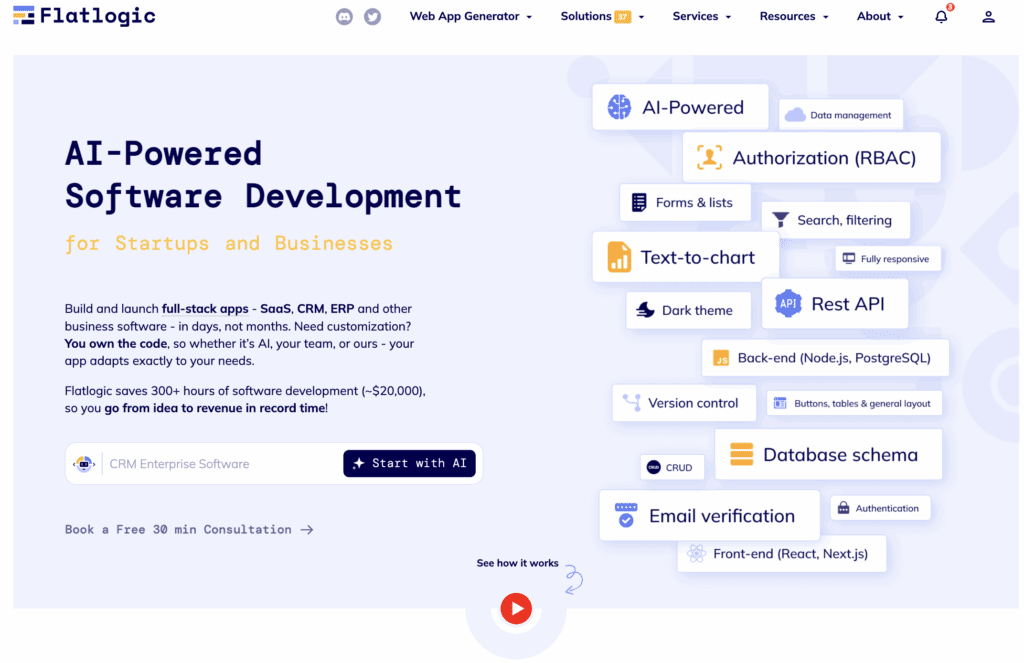
Instead of starting from a blank page, Flatlogic provides a structured, production-ready foundation that includes the core elements most admin panels need: frontend, backend, database models, authentication, roles, and CRUD functionality.
This approach eliminates the need to rebuild repetitive features and allows teams to focus on business-specific logic from the beginning.
For smaller companies, this is a major advantage. You get:
- Faster time to first working version
- Reduced engineering effort on boilerplate code
- Full access to source code and flexibility
- A scalable structure that can evolve with your business
Rather than choosing between slow custom development and limited templates, generator-based platforms offer a middle path: speed without sacrificing control.
Avoiding these common mistakes is not about perfection, it is about prioritization. The goal of admin panel development is not to build everything. It is to build the right system, at the right time, in a way that supports how your business actually operates.
Why This Matters for SMBs and Startups Specifically
For large enterprises, inefficient internal systems are expensive, but manageable. They have dedicated teams, long timelines, and the budget to fix problems over time. Startups and SMBs do not have that luxury.
Every inefficiency hits harder.
Small teams operate under constant pressure: limited resources, tight deadlines, and the need to grow quickly without breaking what already works. In this environment, messy internal systems are not just inconvenient, they directly slow down growth.
Limited resources mean higher stakes
Startups and SMBs cannot afford to waste time on repetitive manual work or inefficient processes.
When a team of five spends hours switching between tools, fixing data inconsistencies, or handling tasks manually, it is not just lost time, it is lost momentum. An admin panel helps consolidate operations so the team can focus on product, customers, and revenue instead of internal chaos.
Speed matters, but so does stability
Early-stage companies prioritize speed, and rightly so. But speed without structure eventually leads to breakdowns.
An admin panel allows you to move fast and stay organized. It provides a stable operational layer where processes are repeatable, visible, and manageable, even as the business evolves.
Growth amplifies existing problems
What works for 10 customers often fails at 100, and completely breaks at 1,000.
Manual workflows, scattered data, and informal processes might seem manageable at first, but they do not scale. Without a proper system in place, growth introduces delays, errors, and confusion that can affect both team performance and customer experience.
An admin panel ensures that as your business grows, your operations grow with it, not against it.
Smaller teams need better leverage
Large companies solve problems by adding people. Startups and SMBs need to solve them by improving systems.
A well-designed admin panel acts as a force multiplier. It enables a small team to handle more customers, more data, and more complexity without a proportional increase in workload.
You cannot afford long development cycles
Spending six months building internal tools from scratch is often unrealistic for smaller companies. That is why the approach to admin panel development matters just as much as the result. SMBs and startups need solutions that deliver value quickly, can be adapted easily, and do not lock them into rigid systems or high costs.
For startups and SMBs, an admin panel is not just infrastructure, it is a competitive advantage. It determines how efficiently your team operates, how quickly you can respond to customers, and how confidently you can scale. In a resource-constrained environment, the right internal system is not just helpful, it is essential.
What Good Admin Panel Development Looks Like in Practice
Good admin panel development is not about adding more features, it is about making everyday work easier, faster, and more reliable.
You can recognize a well-built admin panel by how naturally it fits into your team’s workflow.
It reflects how the business actually works
A strong admin panel mirrors real operations, customers, orders, workflows, not abstract technical structures. Users should not have to figure outthe system. It should feel intuitive from the start.
It makes common tasks fast
Frequent actions like searching, editing records, or resolving issues should take seconds, not minutes. Clear navigation and accessible actions reduce friction and save time every day.
It balances control and usability
Permissions and roles are handled in a way that keeps the system secure without slowing people down. Users see only what they need, and can act without unnecessary barriers.
It highlights what matters
Instead of overwhelming users with raw data, a good admin panel surfaces key insights: important metrics, recent activity, and issues that need attention.
It is flexible and reliable
As the business evolves, the system can adapt without major rewrites. At the same time, it remains fast, stable, and predictable, something the team can rely on daily.
In practice, a great admin panel does not feel like a tool you have to fight with. It feels like a natural extension of how your business runs.
Where Flatlogic Fits Into Admin Panel Development
For startups and SMBs, the biggest challenge in admin panel development is not defining what to build, it is getting a working system fast enough to support growth. Building from scratch takes time. Templates only solve part of the problem. This is where Flatlogic provides a practical alternative.
A faster starting point
Flatlogic generates a production-ready application structure with frontend, backend, database, authentication, roles, and CRUD already in place. Instead of building foundations, teams can immediately focus on business logic.
Focus on real needs
By removing repetitive setup work, Flatlogic lets teams prioritize workflows, processes, and integrations that actually matter for the business.
Flexibility without lock-in
Unlike no-code tools, it provides full access to the source code, so the system can evolve as the company grows.
In practice, Flatlogic offers a middle ground between slow custom development and limited templates, helping startups and SMBs launch faster without sacrificing control.
How AI is changing admin panel development
AI is starting to improve the way internal systems are built, especially in the early stages. Instead of manually defining every part of an application, teams can increasingly describe what they need in plain language, generate a first version of the system, and then iterate. This is powerful when combined with a structured development engine rather than raw code generation alone.
Why? Because businesses do not need random code confetti. They need consistent systems. The strongest approach is not to let the model freestyle your enterprise architecture and pray. The stronger approach is to use AI to understand intent and generate structured application logic on a reliable foundation.
For startups and SMBs, that means faster delivery, less repetitive work, and a shorter path from idea to usable admin panel.
Final Thoughts: Manage Your System Before It Manages You
Admin panel development is not the flashy side of product building. Customers rarely post on social media about your internal control dashboard. But your business will feel the difference every day.
A good admin panel helps your team work faster, reduces manual chaos, improves security, centralizes operations, and gives you a better grip on the business as it grows. For SMBs and startups, that is not a luxury. It is infrastructure. If your team is still managing important workflows through disconnected tools, messy spreadsheets, and improvised workarounds, the real cost is already there. You are just paying it in delays, confusion, and lost focus.
The smart move is not necessarily to build everything from scratch. The smart move is to build the right foundation fast, then customize where it actually matters. That is the real value of modern admin panel development. You do not need another fragile dashboard. You need a system to manage your system. And ideally, one that does not take half a year to become useful.