


TL;DR
- Off-the-shelf CRMs fit the median; when processes deviate, friction and data mistrust grow
- If you see 3+ bottleneck signs (spreadsheets, junk fields, Slack approvals), you’re compensating
- Choose custom when models and approvals are nonstandard; treat CRM as mission-critical infrastructure
- ROI comes from conversion, margin control, cycle time, scale, and trusted reporting—not just nicer UX
- Build pragmatically: map real workflow, ship a narrow MVP to a pilot, iterate; don’t rebuild commodity features
Fact Box
- Ten signs indicate your CRM is the bottleneck; spotting 3+ means you’re compensating, not optimizing
- A custom CRM follows three patterns: purpose-built, CRM orchestration layer, or buy+build
- If CRM friction costs even 1–2 deals per quarter, custom development can already be cheaper
- Deploy a CRM MVP to a pilot; if adoption doesn’t beat the current system within weeks, fix usability
- A good custom CRM needs flexible data model, workflow engine, integrations, permissions, and trusted reporting
Your CRM shouldn’t feel like a compromise. If it does, read this to the end because the real cost isn’t the subscription fee, it’s the friction you’ve normalized.
When people search for “custom CRM development,” they’re usually asking very direct questions:
- When should we stop customizing and start building?
- Is off-the-shelf CRM actually limiting our growth?
- How expensive is a custom CRM really, and what’s the ROI?
- Will building our own system create more chaos or finally remove it?
As management thinker Peter Drucker famously said, “There is nothing so useless as doing efficiently that which should not be done at all.” A CRM that forces the wrong process, even if it’s efficient, is still the wrong process.
The problem isn’t rare, it’s systemic. Industry reports consistently show that CRM adoption struggles with data quality, workflow misalignment, and low user engagement. For example, research from Gartner highlights ongoing challenges around CRM data integrity and user adoption, while studies from Forrester Research emphasize that disconnected systems and poor integration reduce CRM ROI significantly. In other words, many organizations don’t fail at CRM because they lack software; they fail. After all, the software doesn’t reflect how their business actually operates.
By reading this article to the end, you’ll understand when off-the-shelf CRM truly stops making sense, how to evaluate whether custom development is justified, what a well-designed custom CRM must include, and how to approach the build pragmatically without turning it into a never-ending IT project.
The “Off-the-Shelf CRM” Trap: Why It Eventually Breaks
Most popular CRMs are optimized for the median company. That’s not a criticism, it’s their business model. They assume:
- a relatively clean lead → deal → close pipeline
- one dominant sales motion
- predictable, linear reporting needs
- integrations that “mostly” sync
- configuration handled by an admin, not a dev team

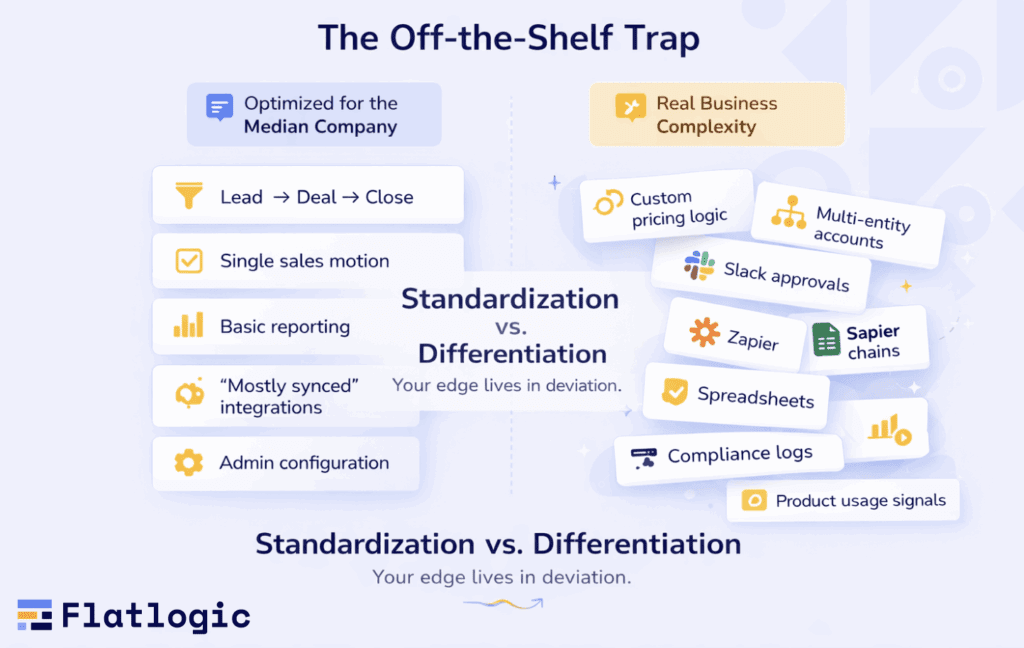
For many businesses, that’s enough. Until it isn’t. The moment your company grows into its real shape, new pricing models, new regions, enterprise contracts, layered approvals, usage-based billing, custom onboarding, and regulatory requirements, you start stretching the CRM beyond what it was designed to represent.
And here’s the uncomfortable truth: Off-the-shelf CRMs are optimized for standardization. Your advantage likely lives in deviation.
Real businesses aren’t median. They’re weird in valuable ways. You might:
- qualify leads based on industry-specific risk factors
- price deals dynamically with finance oversight
- manage multi-entity accounts across regions
- route deals through legal, security, compliance, and product
- track assets, subscriptions, projects, or usage events as core objects
- need audit trails that survive scrutiny
- rely on reporting that reflects operational truth, not what the CRM dashboard happens to show
When your competitive edge is embedded in those “messy details,” forcing it into generic objects like Deal, Account, and Contact starts distorting reality.
What happens next is predictable: You don’t replace the CRM immediately. You “patch” it. You add:
- plugins
- custom fields
- workflow automations
- middleware
- Zapier chains
- custom scripts
- manual exports
- Slack-based approvals
- spreadsheet side systems
Eventually, your CRM becomes less of a system and more of an ecosystem held together by institutional memory and one heroic admin who “knows how it works.”
That’s the trap. The CRM was supposed to centralize and simplify. Instead, it becomes the most fragile layer in your revenue stack.
10 Signs Your CRM Has Become the Bottleneck
If you recognize three or more, you’re not optimizing, you’re compensating.
Your team uses spreadsheets as the source of truth
If Excel is where reality lives, your CRM is just theater. When forecasting, pipeline cleanup, or commission calculations require an export → edit → reimport cycle, the system of record has already lost authority.
Your pipeline stages don’t match how deals actually move
Your “official” process says one thing. Your sales team does another. Deals get advanced just to trigger automations. Stages are updated for reporting optics. Reps use comments to explain what the stage doesn’t capture. When the CRM model diverges from the real process, data becomes fiction.
Custom fields have exploded into a junk drawer
When everything becomes “just another field,” structure collapses. You start seeing:
- 200+ custom fields
- duplicate meanings
- fields used differently by different teams
- required fields nobody understands
At that point, automation becomes unreliable, and reporting becomes interpretive art.
Reporting requires manual cleanup every week
If someone has to:
- Reconcile duplicate accounts
- manually adjust deal amounts
- merge exports from three systems
- “Fix” attribution before leadership meetings
You don’t have reliable analytics. You have a UI layered on top of inconsistent data.
Integrations are fragile and break quietly
The most dangerous failures aren’t loud. They’re:
- missing product usage events
- duplicated invoices
- Incorrect marketing attribution
- unsynced lifecycle stages
When integrations “mostly work,” your forecasts and dashboards become statistically misleading. And nobody notices until revenue slips.
Approval flows live in Slack threads
Discount approvals. Security reviews. Legal sign-offs. Finance checks.
If these happen in chat messages and screenshots, you’re leaking margin and accountability. A CRM that cannot enforce structured approvals becomes a passive database, not a control system.
Permissions are either too loose or too restrictive
When:
- Everyone can see everything (risk exposure)
- Or teams are blocked from collaborating
You’re compensating for a permission model that wasn’t designed for your structure. Granular role-based access shouldn’t feel like a hack.
Your customer lifecycle doesn’t fit the CRM’s mental model
Examples:
- usage-based SaaS
- marketplaces
- multi-entity B2B structures
- partner/reseller ecosystems
- asset-heavy industries
- multi-region compliance workflows
If your real lifecycle can’t be represented cleanly without workarounds, you’re bending the business around the tool. That’s backward.
You’re paying for seats and add-ons nobody loves
You pay for:
- modules nobody uses
- premium features to compensate for missing basics
- extra reporting tools to fix reporting
- integration layers to fix integrations
You fund complexity while still not solving the core issue.
Your CRM slows sales instead of accelerating them
This is the ultimate signal. When reps:
- avoid logging activity
- postpone updates
- complain about admin time
- track deals privately
The CRM has crossed the line from support system to friction source. And friction compounds.
The “Off-the-Shelf Tax”
The cost of misaligned CRM isn’t just subscription fees. It’s:
- slower deal cycles
- margin leakage
- inaccurate forecasts
- lower team morale
- executive decisions based on distorted data
- hidden operational risk
And the longer you normalize that friction, the more “this is just how it works here” becomes part of the culture. That’s when the system is no longer serving the business. The business is serving the system.
What “Custom CRM” Actually Means (It’s Not Starting From Scratch)
Custom CRM doesn’t mean locking engineers in a room and trying to reinvent Salesforce from zero. It means being deliberate about which parts of your revenue engine are generic and which are strategic. A smart custom CRM usually falls into one of three patterns.
Build a purpose-built CRM for your workflow
This is the cleanest approach when your revenue process is fundamentally different from the median company. Best when:
- Your process is genuinely unique
- You require deep, tightly coupled integrations
- reporting must be precise and operationally accurate
- compliance, auditability, or regulatory control is non-negotiable
Here, the CRM is not just a contact database. It becomes a core operational system. The data model reflects your actual business structure, not a generic one. Approvals, lifecycle logic, and reporting are designed around how revenue actually moves, not how software vendors assume it should.
You’re not rebuilding everything. You’re building exactly what matters.
Build a CRM layer around your existing systems
Sometimes your “CRM problem” isn’t really about managing contacts. It’s about fragmentation.
Your billing tool knows one version of the customer. Your product database knows another. Your support system knows a third.
Best when:
- Your CRM is really a coordination hub
- You need a unified customer record across tools
- The CRM acts more as a workflow engine than a database
In this model, the CRM becomes the orchestration layer. It doesn’t duplicate every function. It connects, routes, and enforces logic across systems.
This approach is powerful in SaaS, marketplaces, logistics, services, and any business where revenue flows through multiple operational systems.
“Buy + Build” (keep a core CRM, customize where it matters)
This is often the most pragmatic path. Best when:
- You want commodity features (email sync, calendars, basic contact management)
- but need custom objects, workflows, portals, or analytics
Keep the standard parts standard. Build the strategic parts properly.
For example:
- Use off-the-shelf for email logging
- build custom modules for pricing logic
- Create a tailored approval workflow
- design reporting outside the CRM if needed
- Build a client portal connected to your data model
The key shift is mental: Stop debating “build vs buy” like it’s ideology.
Instead, ask: Where does your revenue process stop being generic? That’s the part you customize.
A Practical Decision Framework: Build vs Configure vs Replace
Rather than making an emotional decision, use a filter.
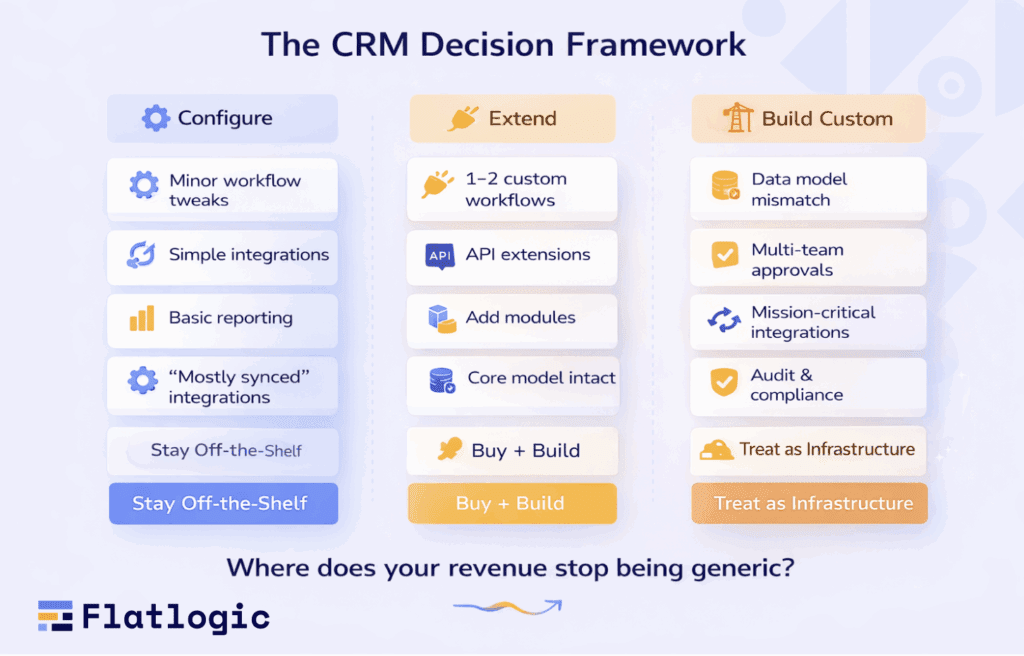
Stay off-the-shelf (configure it) if:
- Your main issue is training or adoption
- Your workflow fits with minor adjustments
- Integrations are simple and stable
- reporting needs are standard
- Compliance requirements are light
In this case, the tool isn’t the bottleneck usage discipline is.
Extend off-the-shelf (custom modules + integrations) if:
- You need one or two custom workflows with a clear ROI
- Your core data model still works
- The vendor provides strong APIs and extensibility
Here, customization should be surgical, not architectural.
Build custom if:
- Your data model fundamentally doesn’t fit
- Revenue workflows involve multiple teams and layered approvals
- You require granular role-based access and audit trails
- You’re building a portal or operational system anyway
- integrations are mission-critical and must be deterministic
- The “CRM tax” is measurable in lost deals, margin, or time
When revenue depends on this system daily, its infrastructure. And infrastructure should not be treated like a casual subscription.
Rule of thumb: If the CRM is mission-critical, treat it like mission-critical infrastructure.
What a Good Custom CRM Includes (No Fluff, Just the Non-Negotiables)
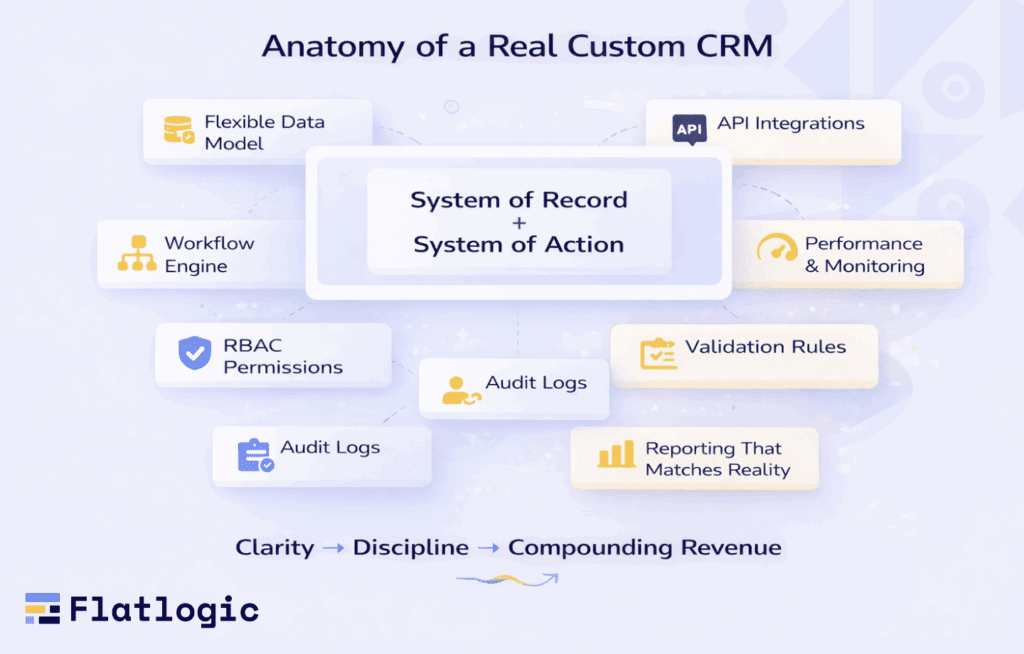
A custom CRM succeeds when it’s designed as: System of record + system of action. Not just a database. Not just a dashboard. Both.
- Flexible Data Model. Accounts, contacts, deals, activities, plus your real entities:
- subscriptions
- assets
- projects
- locations
- contracts
- service units
- usage metrics
If your business revolves around something other than “deals,” your CRM should reflect that structurally.
- Workflow Engine. Real routing. SLAs. Approvals. Automations. Notifications.
Workflows should enforce discipline, not rely on memory.
- Integration Layer. API-first architecture. Event-driven when possible. Clear sync rules. Conflict resolution strategy.
“Mostly synced” is not acceptable when forecasts depend on it.
- Permissions & Auditing. Role-based access. Field-level visibility when necessary. Immutable logs for sensitive changes.
This is critical in finance, healthcare, manufacturing, enterprise SaaS, and any regulated environment.
- Reporting That Matches Reality. Pipeline that reflects real deal flow. Cohort retention. Accurate attribution. Operational metrics.
If leadership doesn’t trust the dashboard, the CRM has already failed.
- Performance and Reliability. Fast search. Deduplication logic. Background jobs. Monitoring.
Nothing kills adoption like lag and inconsistency.
The Underrated Requirement: Data Quality
You can design the cleanest UI in the world. It won’t save you from bad data discipline. Custom CRM development is your chance to fix this structurally.
Bake in:
- validation rules that prevent garbage input
- required fields only where they matter
- consistent definitions (what exactly is a “qualified lead”?)
- a single owner per record with explicit handoff logic
- clear lifecycle states with enforced transitions
Most CRM failures are not technology failures. They’re governance failures disguised as UX problems. A well-built custom CRM forces clarity and clarity compounds. That’s the difference between software that stores activity and software that drives revenue.
The Real ROI of Custom CRM (It’s Not Just “Better UX”)
When companies talk about upgrading their CRM, the conversation often drifts toward interface improvements and convenience. But better UX alone rarely justifies custom development. The real return on investment comes from structural improvements in how revenue flows through your organization, “how deals are qualified, approved, tracked, and closed. A custom CRM pays for itself when it changes outcomes, not when it simply looks cleaner.
A custom CRM delivers ROI when it does at least one of these exceptionally well:
Increases Conversion
A well-designed CRM enforces the right behavior at the right moment. It:
- requires pa roper qualification before advancing to the next stage
- surfaces critical context before meetings
- prevents incomplete or misleading deal updates
- forces clarity on next steps
This reduces “pipeline fantasy,” where deals look healthy but lack substance. When stages reflect reality and qualification is structured, conversion improves naturally. Even a small increase in win rate can justify the entire project.
Protects Margin
Revenue growth means little if margin erodes. Custom logic allows you to:
- enforce discount thresholds
- require multi-level approvals
- track deal profitability in real time
- log compliance or legal checks
Instead of informal Slack approvals or undocumented exceptions, you gain structured accountability. That control directly protects profitability.
Shortens Cycle Time
Administrative drag is invisible but expensive. A properly designed CRM:
- eliminates duplicate data entry
- automates task creation
- routes deals intelligently
- reduces friction between teams
Cleaner handoffs mean faster decisions. And faster decisions mean faster revenue realization.
Enables Scale Without Chaos
Growth exposes structural weaknesses. New reps. New products. New geographies.
If every expansion requires more fields, more exceptions, and more workarounds, the CRM becomes fragile. A custom system scales intentionally ” with structured data, clean workflows, and modular logic.
Reduces Integration and Reporting Tax
If your leadership team regularly debates “whose numbers are correct,” your CRM isn’t functioning as a reliable source of truth. Manual reconciliation, duplicated exports, and constant adjustments create a hidden operational tax. Deterministic integrations and reporting aligned with your real workflow eliminate that recurring cost.
A blunt metric: If CRM friction costs even 1-2 deals per quarter, custom development can already be cheaper than continuing with the status quo.
A Sensible Build Approach: Start Narrow, Ship Fast, Iterate
Custom CRM projects fail when they attempt to replace everything at once. Large, multi-year transformations create risk and fatigue. Instead, approach it like product development.
Step 1: Map the Real Revenue Workflow
Forget the official documentation. Map the real process:
- Who touches the deal?
- What decisions are made at each step?
- What data is required before moving forward?
- Where do deals stall?
- What approvals happen informally?
This exercise often reveals that your actual process already lives outside the CRM. That’s the part worth rebuilding properly.
Step 2: Define the Smallest CRM That Creates Leverage
Start with a focused scope:
- A clean and accurate pipeline
- One or two high-impact automation workflows
- Reliable integration with billing or product data
- Reporting leadership genuinely trusts
Avoid feature overload. Build leverage, not complexity.
Step 3: Build an MVP and Deploy to a Pilot Group
Roll out to a small team first. If adoption doesn’t exceed your current CRM within weeks, the issue isn’t infrastructure; it’s usability. Fix that early. Treat your CRM like a product, not an internal IT tool.
Step 4: Expand into Modules
Once the core proves stable, expand carefully:
- Renewals
- Customer success workflows
- Partner sales
- Quoting
- Commissions
- Support handoffs
- Client portals
Layer functionality in stages. A CRM evolves; it doesn’t appear fully formed.
Three “When Off-the-Shelf Fails” Scenarios (Realistic Examples)
Certain business models expose CRM limitations more quickly than others.
Scenario A: B2B SaaS with Complex Accounts
You need:
- Parent/child account structures
- Usage-based billing signals inside CRM
- Structured security and legal approvals
- Renewal risk scoring
Off-the-shelf CRMs can approximate this with plugins and integrations. But the glue becomes your real system,” and glue is brittle.
Scenario B: Services Company with Project Delivery
Your lifecycle isn’t just lead → deal. It’s: lead → deal → contract → project → invoices → margin tracking. You need:
- Resource allocation visibility
- Scope change tracking
- Margin protection
Most CRMs resist becoming operational delivery systems. But for services firms, revenue and delivery are inseparable.
Scenario C: Manufacturing / Logistics
You manage:
- Assets
- Orders
- Locations
- Service schedules
- Territory routing
- Compliance logs
Generic “contacts and deals” logic doesn’t reflect this complexity. In these cases, the CRM is fundamentally a domain system with CRM features, not the other way around.
The Biggest Mistakes in Custom CRM Development
Avoid These, and You’ll Look Like a Genius. Custom CRM projects fail more often from mismanagement than from technical constraints. Here’s what to avoid:
Rebuilding Commodity Features
Don’t spend months perfecting email sync or calendar UI. Differentiate where it matters. Use existing solutions where it doesn’t.
Designing for Admins Instead of Users
Reps don’t care about your data model elegance. They care about speed and clarity. If it slows them down, they won’t use it properly.
Ignoring Data Migration and Definitions
A new CRM won’t fix messy definitions. Before migrating:
- Standardize stages
- Clean duplicates
- Define qualification criteria
- Archive irrelevant data
Structure first. Import second.
Over-Automating Too Early
Automation amplifies the process. If the process is unclear, automation scales confusion. Start with clarity, then automate intentionally.
No Clear Ownership
Every successful CRM needs a product owner. Not a shared committee. Not vague IT oversight. A single accountable person who understands revenue mechanics.
Where Flatlogic Fits: Custom CRM Without the Usual Drag
One of the main reasons companies hesitate to build custom CRM systems is the perceived engineering overhead. Authentication. Roles and permissions. CRUD interfaces. Admin dashboards. Infrastructure scaffolding. Basic integrations. These are necessary, but not differentiating. Flatlogic accelerates this foundation.
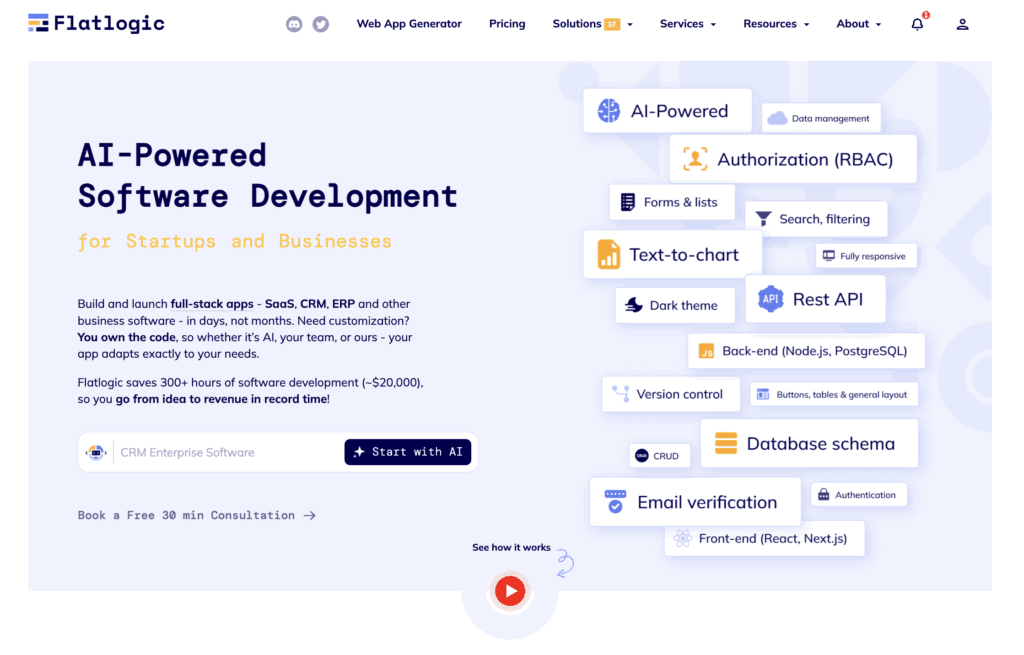
Using our AI Software Engineer combined with structured engineering services, we:
- Generate a production-ready foundation rapidly
(data model, backend, screens, permissions) - Deliver real code you own, ” no low-code lock-in
- Enable fast iteration on workflows and integrations
- Focus engineering effort on the parts that actually drive revenue
The idea is simple: Spend your time building what makes your business unique. Automate and standardize the rest. That’s how custom CRM becomes practical and strategically sound.
Conclusion
A CRM should support how your business actually operates, not force you into a generic model that only “mostly” fits. Off-the-shelf tools work well for standard sales flows. But when your competitive edge depends on complex workflows, approvals, integrations, or data structures, friction starts to build. That friction shows up as unreliable reports, slower deals, margin leakage, and teams working around the system instead of inside it.
Custom CRM development isn’t about rebuilding everything from scratch. It’s about identifying where your revenue process stops being generic and designing that part intentionally.
If your CRM is mission-critical to how you sell, deliver, and scale, treat it like infrastructure, not just a subscription.
The goal isn’t more software. It’s a better alignment between how your business works and the system that runs it.