


TL;DR
- Build a map-first weather risk MVP in days using AI app builders like AppWizzy
- Follow a path: auth → DB → AI → maps/dashboards → integrations → deploy
- Start with a simple schema and seeded data; add live feeds later
- Ship AI chat for summaries, proximity impacts, and risk explanations
- Deploy early, run 5-10 demos, then invest in ingestion and modeling
Fact Box
- Seed with 2-3 storms and 20-50 assets to make maps and dashboards feel live on day one.
- AI capability: list assets within 50 km of a storm’s projected path.
- Alerts: when a new risk_snapshot exceeds an asset threshold, send email and Slack webhook, then log it.
- Founder workflow: deploy early and run 5-10 demos before building live ingestion or advanced models.
- MVP schema includes storms, storm_points, assets, risk_snapshots, and alerts tables.
Bold idea: you can build a weather-associated risk management platform + interactive map app in days (not months) using AI web app builders, stick with me to the end, and you’ll have a clear, founder-friendly blueprint.
Are you searching because you’re asking yourself:
- How do I build a weather-associated risk management platform without hiring a full dev team?
- Which AI tweb app builders can actually handle auth, databases, maps, and AI chat?
- What’s the fastest MVP path, and what will it cost me?
- Where do no-code tools break, and how do I avoid dead ends?
Any sufficiently advanced technology is indistinguishable from magic. , Arthur C. Clarke
The challenge is real: founders want sophisticated, data-heavy products, AI insights, map-first dashboards, real-time updates, and collaboration, but traditional development is expensive and slow, especially for SMBs. At the same time, AI builders are rapidly improving, and research on low-code/citizen development consistently highlights both the upside (speed, accessibility) and the risks (scalability, lock-in, maintainability, governance). Knowing these tradeoffs upfront is how you move fast without painting yourself into a corner.
By the time you finish this article, you’ll know how to translate a weather-associated risk management platform into a practical feature checklist, pick the right no-code AI builders (like AppWizzy) for each component, assemble an MVP step-by-step (auth → database → AI → maps/dashboards → integrations → deploy), and make smart decisions about what to ship now vs. what to reserve for custom engineering later.
What is the Weather-Associated Risk Management Platform?
A weather-associated risk management platform is a climate-tech platform that uses AI + data visualization to help organizations understand and act on extreme weather risk. In plain terms, it combines weather/climate data, forecasting models, and a map-first dashboard so users can explore storms, patterns, and risk signals in a more operational, decision-friendly way. 
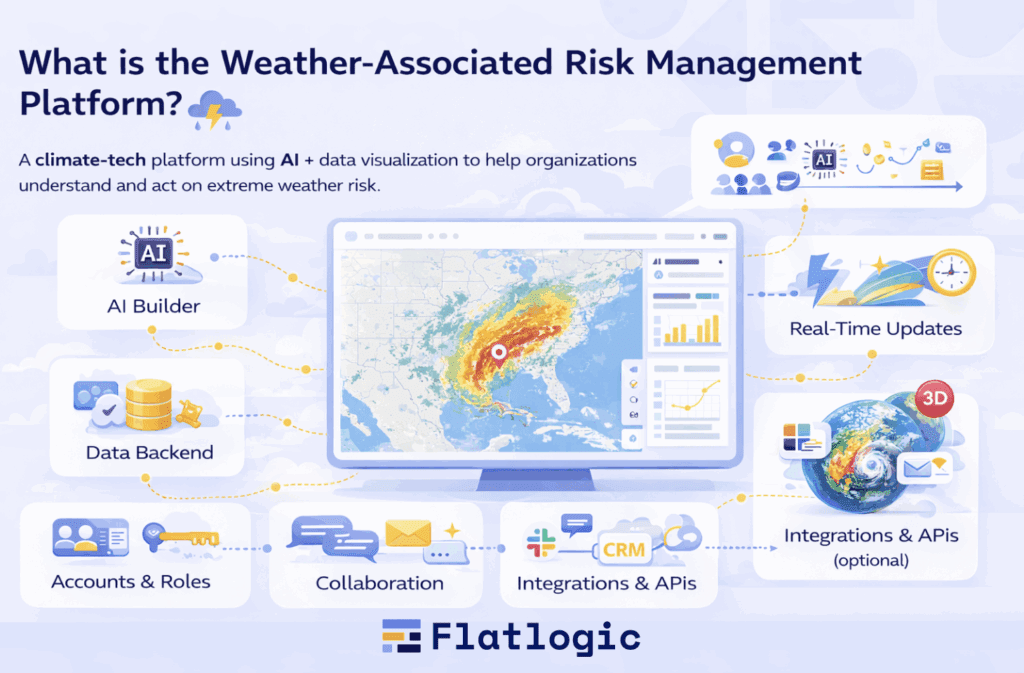
Core Features of a Weather-Associated Risk Management Platform
A weather-associated risk management platform is essentially a weather-risk dashboard + collaboration workspace. Here’s what you typically need:
| Core feature | What it does in the product | AI-builder approach |
| User accounts & roles | Secure login, user profiles, role-based access (admin/analyst/viewer) | Generate auth + roles; connect to built-in auth (e.g., Supabase-style) |
| Data backend | Stores storm events, forecasts, user notes, assets, business context | Auto-generate DB tables + CRUD screens; import CSVs; connect external APIs |
| AI layer | Summaries, Q&A, anomaly detection, basic predictions, report drafts | Plug in GPT-like APIs; prompt-based AI assistant; optional custom ML via API |
| Real-time updates | Live storm feeds update maps/charts as data changes | Use polling/webhooks; automation workflows; real-time DB subscriptions where available |
| Interactive visualization | Map overlays, storm tracks, dashboards, filters, drill-down views | Add map + chart widgets; bind UI components to DB fields; build dashboards from templates |
| Collaboration | Shared dashboards, comments, assignments, team workspaces | Built-in team access + permissions; activity logs; comments/notes modules |
| Integrations & APIs | Weather providers, alerts, Slack/email, BI tools, CRM | Use connectors (e.g., n8n/Zapier-style); REST API calls; scheduled sync jobs |
| Immersive extras (optional) | 3D globe, richer animations, story-mode reports | Embed WebGL/3D widgets or external map views; keep MVP 2D-first |
Together, these pieces create the immersive data experience: live map + dashboards + AI assistance, wrapped in a secure, shareable product your team (and customers) can actually use. Next, we’ll translate this feature set into a practical MVP build plan using AppWizzy.
How to Build a Weather-Associated Risk Management Platform with AppWizzy
Let’s name our MVP: StormScope, an AI-assisted, map-first dashboard that tracks extreme-weather events, layers in business context (assets, inventory, locations), and answers questions via chat.
The goal is to ship a believable founder-grade MVP quickly, using AppWizzy to scaffold the product (frontend, backend, and database), then add maps, data feeds, and automations as needed. AppWizzy is designed to turn a plain-English description into a structured, production-ready web app, while keeping full code ownership.
What we’ll build in StormScope (MVP scope)
- Login + roles (admin/analyst/viewer)
- Database of storms + locations + assets at risk
- Interactive map + dashboard charts
- AI chat: What’s the risk to Warehouse A this week?
- Alerts: email/Slack when risk crosses a threshold
- One-click deploy + shareable URL
The weather-associated risk management platform UX centers on interactive maps and real-time storm tracking. This is the experience we’re recreating at the MVP level.
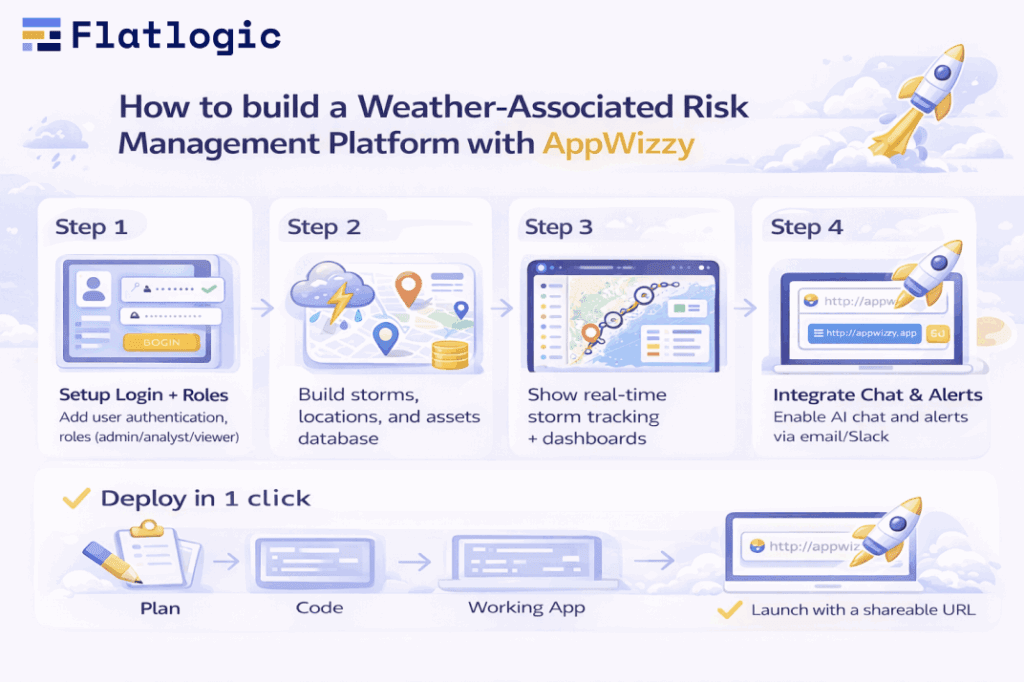
Step 1: Generate the app skeleton (plan → code → working app)
AppWizzy describes in plain English flow creates a software architecture plan and database schema automatically, then generates the app code.
Prompt to start (copy/paste):
`Build a SaaS web app called StormScope.
Needs: user authentication, roles (admin/analyst/viewer), a dashboard, a map page, a storms database, an assets database (locations with value), alerts, and an AI chat assistant that answers questions using storm + asset data. Include an admin panel to manage storms/assets.`
Founder tip: also ask AppWizzy to start from a dashboard/admin template (seed) so you don’t lose time on layout. AppWizzy supports picking a pre-built seed/template as a step in the flow.
Step 2: Define the data model (keep it MVP-simple)
Start small, this is enough for a convincing demo and a usable foundation:
- storms: id, name, status, start_date, region, summary
- storm_points: storm_id, timestamp, lat, lng, intensity, pressure (optional)
- assets: id, name, lat, lng, value, owner_team, notes
- risk_snapshots: asset_id, storm_id, risk_score, timestamp, explanation
- alerts: id, asset_id, rule_type, threshold, channel, enabled
How to do it in AppWizzy: prompt it to create these tables and generate CRUD + REST endpoints for each. AppWizzy positions itself around generating production-ready apps with standard business features like auth, CRUD, APIs, and dashboard widgets.
MVP trick: ask for seed data (2-3 storms, 20-50 assets) so the map and dashboard look alive on day one.
Step 3: Add the map-first experience (your main UX differentiator)
Your Map page should do three things:
- Plot storms (current point + track line)
- Plot assets (pins sized by value)
- Filter by time window + risk threshold
Prompt (copy/paste):
Add an interactive map page that shows storms as track polylines from storm_points and assets as markers from assets.
Clicking a storm or asset opens a right-side detail panel.
Add filters: time window (24h/72h/7d), storm selector, and assets with risk_score > X.
MVP trick: if live storm feeds are too much initially, keep it seeded. Once you validate the UX, you can replace the seed generator with a real weather API ingestion job.
Step 4: Wire the AI assistant to your data
This is where the product stops being just a dashboard.
Capabilities to ship first
- Storm summary: What’s happening with Storm X?
- Asset impact: Which assets are within 50 km of Storm X’s projected path?
- Explain risk: Why is Warehouse A risk_score 0.82?
Implementation pattern (works well in AppWizzy)
- Use a hosted LLM (e.g., GPT-style API)
- Retrieve relevant rows by querying your own DB (storms, storm_points, assets, risk_snapshots)
- Return a structured response: answer + which records were used (IDs/links)
Prompt (copy/paste):
Add an AI chat assistant that answers using our database.
For every answer, return: (1) a short summary, (2) the IDs of storms/assets/risk_snapshots used, (3) recommended next action.
Step 5: Add it feels live updates + alerts (without overengineering)
Real-time-ish updates (MVP)
Don’t overbuild streaming on day 1. A simple approach that still feels real:
- scheduled refresh (every N minutes)
- manual refresh data button
- background job that appends new storm_points
Prompt (copy/paste):
Add a background job that periodically appends new storm_points for active storms and updates map + dashboard on refresh.
Alerts
Keep alerts rules-based for the MVP:
- If risk_score > threshold → send email/Slack webhook
- Log alert activity to a table
Prompt (copy/paste):
Implement alerts: when a new risk_snapshot is created and risk_score exceeds the asset’s threshold, send an email and post to a Slack webhook, then write an alert fired entry to the database.
Step 6: Deploy, share, iterate like a founder
AppWizzy provides a deployment flow with dev/stable environments and guided steps.
Founder workflow
- Deploy early (even with mocked data)
- Run 5-10 demos
- Only then invest in hard parts (live ingestion, advanced modeling, 3D)
Common founder mistakes (and how AppWizzy helps you avoid them)
- Building real forecasting AI on day 1 → start with chat + retrieval + rule-based risk scoring.
- Overbuilding the schema → MVP tables first; expand after you see real usage.
- Lock-in anxiety → AppWizzy emphasizes full code ownership and a professional dev workflow so you can extend and scale beyond the generator.
Why AI App Generators Change the Economics (Not Just the Speed)
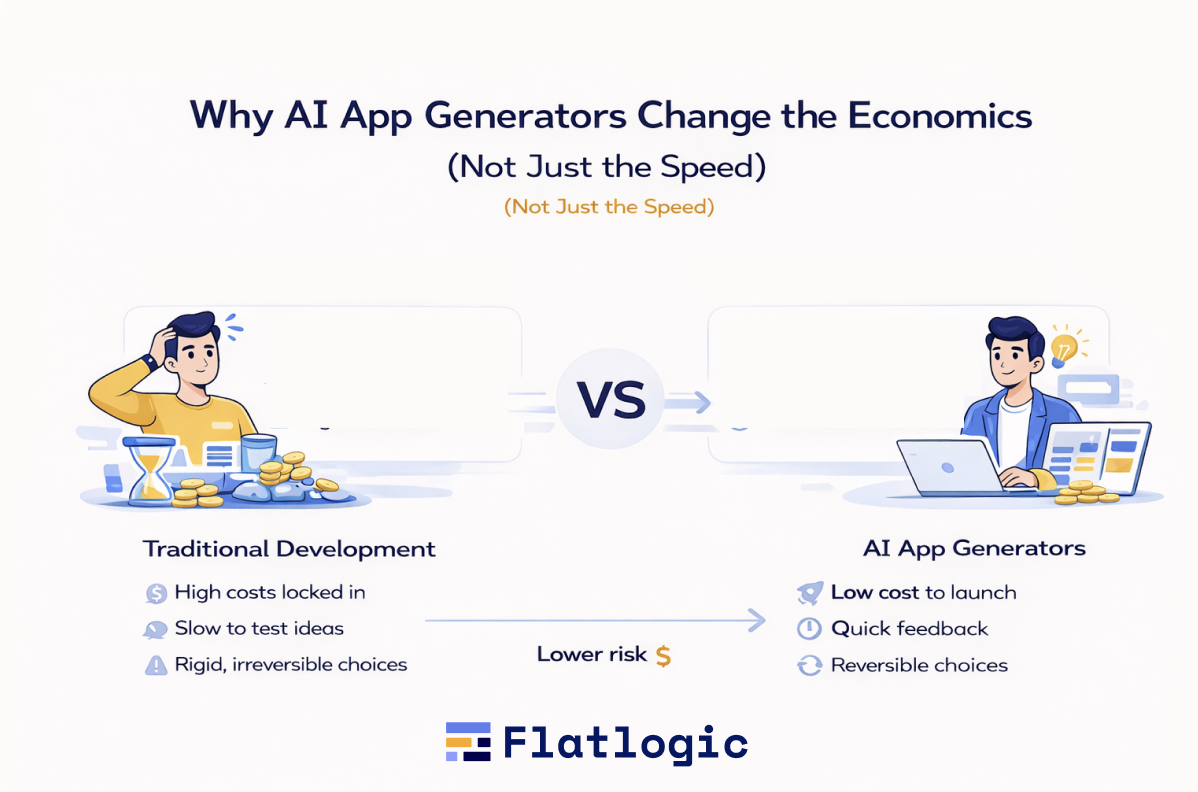
The real shift is economic, not technical
AI app generators are often described as having faster development. That’s accurate, but shallow. The real change is economic: when founders are forced to commit, how much risk they carry early, and how reversible their decisions are.
Traditional development assumes certainty too early. Before users touch anything, founders must lock in architecture, data models, workflows, and teams. By the time feedback arrives, money and time are already sunk. Many products fail not because they were badly built, but because they were over-committed before reality showed up.
Traditional product economics: early certainty, late learning
In a classic build, learning is delayed and expensive. You plan, spec, and implement for months, then discover which assumptions were wrong. Changing direction at that point is painful, politically difficult, and costly. As a result, founders subconsciously defend early choices instead of questioning them.
This is not a technical problem. It’s a capital-allocation problem.
AI app generators flip the order
Tools like AppWizzy change the sequence. You still get structure, auth, database, admin, deployment, but without pretending the first version is final. You see a working product quickly, with real screens and real data, while the cost of being wrong is still low.
That single change alters founder behavior. You stop arguing about hypothetical users and start observing real ones. You stop optimizing prematurely and start testing boundaries. The product evolves after contact with reality, not before.
Optionality is the hidden advantage
Speed is visible. Optionality is not, but it’s more powerful.
When early decisions are reversible, you can:
- reshape the data model without guilt
- drop features that looked smart but don’t get used
- pivot the core workflow without rewriting everything
This is especially important for ambitious, data-heavy products. Map-first dashboards, AI summaries, and collaborative workflows look complex, but most of their cost comes from plumbing, not insight. AI app generators remove that plumbing from the critical path, letting founders invest attention where differentiation actually lives.
Why does this matter for a weather-associated risk management platform
Climate, risk, and analytics platforms feel enterprise-grade at first glance. Historically, that meant big teams and long timelines. In practice, the early value comes from clarity: can users understand the situation, ask good questions, and make better decisions?
AI app generators make it rational to test that value early, before building advanced models, live ingestion, or complex simulations. You earn the right to go deeper instead of betting everything upfront.
The core takeaway
AI app generators don’t just compress timelines. They move risk to the moment when you finally have information.
They turn early product decisions from permanent bets into experiments.
That’s what changes economics, and why building ambitious products becomes strategic instead of reckless.
Why Choose AppWizzy for This Kind of Product
Not all AI app builders are suitable for weather-associated risk management platforms. Many are optimized for demos, landing pages, or lightweight tools that look convincing but collapse under real usage. Products that combine data ingestion, maps, analytics, and decision support require structure, extensibility, and a clear path beyond the MVP.
This is where AppWizzy fits unusually well.
AppWizzy is built around structured generation, not free-form code dumping. You describe intent, workflows, and data relationships in plain language, and the system produces a coherent application: schema, APIs, UI, and deployment. For weather-associated risk platforms, this matters because everything depends on the data model. If the schema is wrong, everything built on top of it degrades.
It also prioritizes code ownership and a professional workflow. The generated app is not a black box. You can inspect it, extend it, version it, and, when needed, move beyond the generator entirely. This avoids the most dangerous form of lock-in: the one that only appears after the product starts working.
AppWizzy handles the unglamorous but essential parts automatically: authentication, roles, admin panels, CRUD APIs, and deployment. These pieces are expensive, time-consuming, and unavoidable in risk management software, yet rarely differentiated. By taking them off the critical path, AppWizzy lets founders focus on insight, UX, and decision value.
Finally, AppWizzy supports an incremental path to complexity. You can start with seeded data and simple rules, then layer in live ingestion, richer analytics, or custom models later, without rewriting the app. That mirrors how real weather, climate, and risk platforms evolve in practice.
In short, AppWizzy isn’t about skipping engineering. It’s about postponing irreversible engineering decisions until they’re justified.
Conclusion: Build Reality First, Optimize Later
Building a weather-associated risk management platform no longer requires a leap of faith, a large team, or months of invisible work. AI app generators make it possible to move from idea to a usable system fast enough to test what actually matters: do users understand the data, trust the insights, and change their decisions?
The point is not that no-code is enough or that AI replaces engineers. The real shift is that early certainty is a myth. Traditional development forces founders to pay for that myth upfront, while AI app generators make early exploration cheap, fast, and reversible.
For ambitious, data-heavy products, this changes the game. You can validate workflows before building complex models. You can test UX before scaling ingestion. You can learn before you commit capital and team.
Build something real. Put it in front of users. Let reality push back. Only then is it worth going deeper. That’s how modern weather-associated risk management platforms are built today.