


TL;DR
- An admin panel is a secure internal interface to manage users, data, configs, billing, and workflows in a SaaS product.
- For startups/SMBs, admin panels centralize operations, reduce manual work, and enable faster, data-driven decisions.
- Modern admin panels go beyond CRUD with RBAC, analytics, automation, audit logs, integrations, and strong security.
- Admin panel = action/control; dashboard = visibility/insight, and many SaaS products combine both.
- Build vs buy: pre-built panels speed early launches; custom builds make sense later when needs are clear.
Fact Box
- An admin panel is a secure internal interface for authorized users to manage the app, its users, data, and configurations.
- The article distinguishes: Admin panel = action/control; dashboard = visibility/insight.
- The article lists core admin-panel features including RBAC, audit logs, analytics/reporting, and workflow automation.
- It advises most startups/SMBs to start with a pre-built admin solution and consider custom-building later as needs grow.
- Flatlogic is described as generating full-stack apps with ready-to-use admin panels, including auth, user management, and dashboards.
If you’re building or scaling a SaaS product, your admin panel isn’t just a backend tool, it’s the control center that can make or break your operational efficiency, product velocity, and user experience.
When searching for this topic, you’re probably asking:
- What exactly is an admin panel in modern SaaS?
- Why is it critical for startups and SMBs?
- Should I build one from scratch or use a pre-built solution?
- What features does a good admin panel include?
As Martin Fowler, a renowned software architect, once said:
“Any fool can write code that a computer can understand. Good programmers write code that humans can understand”.
The same applies to admin panels, they must not only function but also empower humans to manage complex systems efficiently.
The need for effective admin panels has grown alongside the explosion of SaaS products. According to industry research from sources like Gartner and McKinsey, companies that invest in internal tooling and operational efficiency outperform competitors in speed, scalability, and cost control. Poorly designed admin systems lead to operational bottlenecks, increased support costs, and slower decision-making, all critical risks for startups and SMBs trying to grow quickly.
By the end of this article, you’ll understand what an admin panel is in the context of modern SaaS, why it’s essential for small and growing businesses, what features to prioritize, and how to choose or build the right solution for your needs.
What Is an Admin Panel?
An admin panel (also known as an admin dashboard or back office) is a secure internal interface that allows authorized users, typically admins, support agents, or operations teams, to manage the application, its users, data, and configurations.
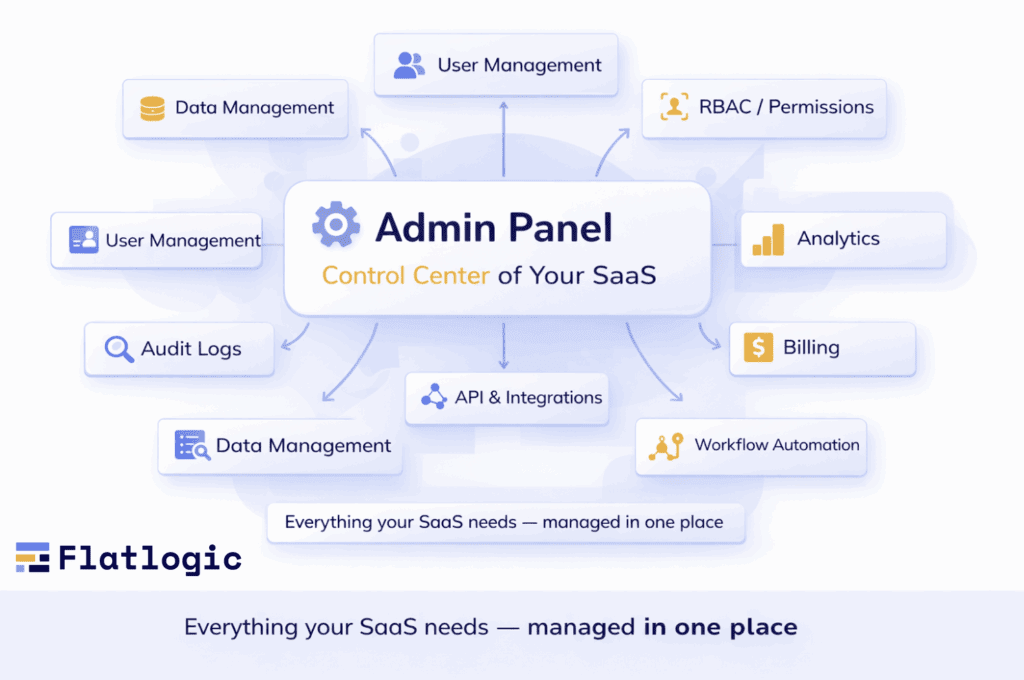

In modern SaaS, an admin panel is far more than a CRUD (Create, Read, Update, Delete) interface. It acts as:
- A control center for managing users, permissions, and data
- A monitoring tool for tracking system performance and usage
- A decision-support interface powered by analytics
- An operations hub for customer support, billing, and workflows
For SMBs and startups, the admin panel often becomes the backbone of daily operations.
Why Admin Panels Matter for SMBs and Startups
For small and medium-sized businesses (SMBs) and startups, resources are always limited, whether it’s time, budget, or team size. Unlike large enterprises that can afford multiple specialized tools and departments, growing companies need streamlined solutions that maximize efficiency without adding complexity. This is exactly where a well-designed admin panel becomes indispensable.
Centralized Operations in One Place
An admin panel acts as a single source of truth for your business operations. Instead of switching between different tools for user management, billing, analytics, and support, teams can access everything from one unified interface.
This centralization reduces context switching, minimizes errors, and helps teams stay aligned. For startups moving fast, having all critical operations in one place is not just convenient, it’s a competitive advantage.
Faster Decision-Making with Real-Time Data
In early-stage companies, speed is everything. Founders and teams need immediate access to key metrics and insights to make informed decisions.
Admin panels provide real-time visibility into:
- User behavior
- Revenue metrics
- System performance
- Operational bottlenecks
With this information readily available, teams can quickly identify issues, test solutions, and iterate without delays.
Lean Teams, Higher Productivity
Startups often operate with small, cross-functional teams where individuals wear multiple hats. An efficient admin panel reduces the need for manual work by automating repetitive tasks and simplifying complex processes.
For example:
- Customer support can resolve issues without engineering involvement
- Product managers can adjust configurations without writing code
- Operations teams can manage workflows with minimal effort
This allows teams to focus on high-impact activities instead of getting bogged down by operational overhead.
Improved Customer Support and Retention
Customer experience can make or break a SaaS product, especially in competitive markets. Admin panels empower support teams with the tools they need to assist users quickly and effectively.
Support agents can:
- Access user accounts and activity history
- Troubleshoot issues in real time
- Manage subscriptions or permissions instantly
Faster resolution times lead to higher customer satisfaction, better retention, and stronger brand loyalty.
Scalability Without Chaos
What works for 100 users may not work for 10,000. As startups grow, operational complexity increases, more users, more data, more edge cases.
A robust admin panel ensures that your internal processes scale alongside your product. With features like role-based access control, audit logs, and automation, businesses can maintain order and security even as they expand rapidly.
Cost Efficiency and Resource Optimization
Building and maintaining multiple internal tools can be expensive. A comprehensive admin panel reduces the need for additional software and manual processes, leading to significant cost savings.
Moreover, by improving efficiency and reducing errors, admin panels help teams do more with fewer resources, a critical factor for SMBs operating on tight budgets.
Enabling Data-Driven Growth
Modern SaaS growth is driven by data, not guesswork. Admin panels provide actionable insights that help teams understand what’s working and what’s not.
With built-in analytics and reporting, businesses can:
- Track KPIs and growth metrics
- Identify churn risks
- Optimize user journeys
- Prioritize product improvements
This data-driven approach enables smarter strategies and sustainable growth.
In essence, an admin panel is not just a backend tool, it’s the operational backbone of a SaaS business. For SMBs and startups, it provides the structure, visibility, and efficiency needed to scale successfully without losing control.
Key Features of a Modern SaaS Admin Panel
A modern SaaS admin panel is no longer just a basic interface for managing data, it’s a powerful operational hub that supports decision-making, automation, and scalability. For SMBs and startups, choosing or building an admin panel with the right features can significantly impact efficiency, security, and growth.
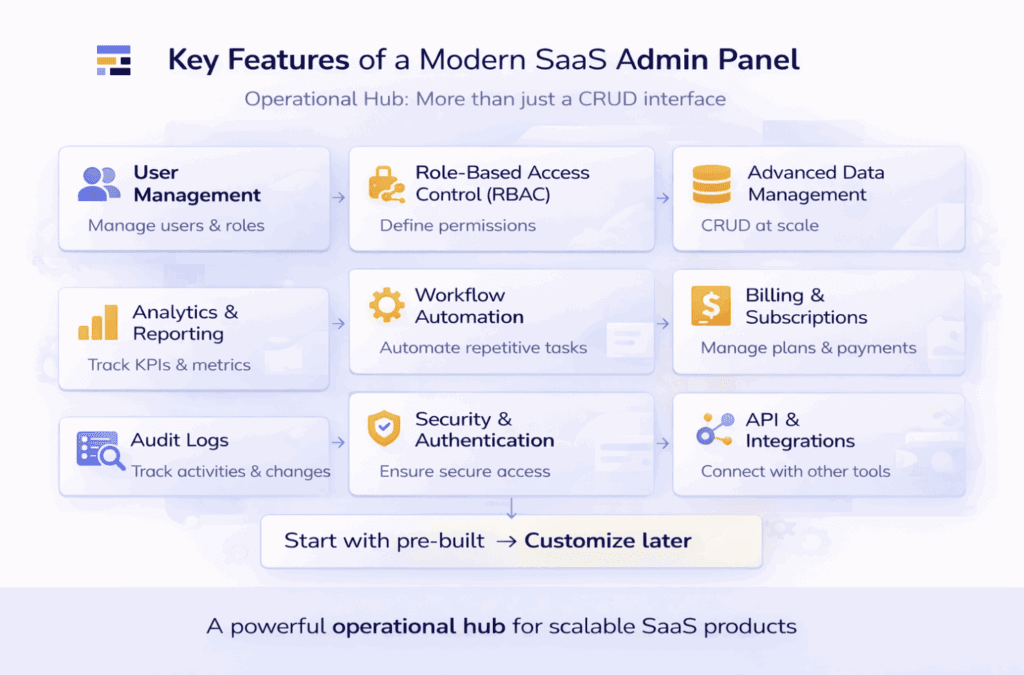
Below are the essential features every modern SaaS admin panel should include.
User Management
User management is the foundation of any admin panel. It allows teams to oversee who is using the platform and how they interact with it.
Core capabilities include:
- Creating, editing, and deleting user accounts
- Viewing user profiles and activity history
- Managing account status (active, suspended, etc.)
- Handling user segmentation (e.g., free vs paid users)
A well-designed user management system helps teams maintain control while delivering a seamless user experience.
Role-Based Access Control (RBAC)
As teams grow, not everyone should have access to everything. Role-Based Access Control (RBAC) ensures that users within your organization only see and interact with what’s relevant to their role.
Typical roles might include:
- Admin (full access)
- Support agent (limited user access)
- Analyst (read-only data access)
RBAC improves both security and operational clarity, reducing the risk of accidental or unauthorized changes.
Advanced Data Management
Modern admin panels must handle large volumes of data efficiently. This goes far beyond simple CRUD operations.
Key capabilities:
- Powerful search and filtering
- Bulk actions (edit, delete, export)
- Pagination and performance optimization
- Data import/export tools
Advanced data tables with flexible views allow teams to quickly find and act on the information they need.
Analytics and Reporting
Data visibility is crucial for informed decision-making. A strong admin panel includes built-in analytics that transform raw data into actionable insights.
Features to look for:
- Real-time dashboards
- Customizable KPIs
- Visualizations (charts, graphs)
- Scheduled or on-demand reports
These tools help teams monitor performance, identify trends, and optimize product strategy.
Workflow Automation
Automation is a game-changer for lean teams. It reduces manual effort and ensures consistency across operations.
Examples of automation:
- Triggered emails or notifications
- Status changes based on user actions
- Approval workflows
- Task assignments
By automating repetitive processes, teams can focus on higher-value work.
Billing and Subscription Management
For SaaS businesses, managing subscriptions and payments is a core function.
Essential capabilities:
- Plan management (tiers, pricing)
- Subscription tracking
- Invoice generation
- Refund handling
- Integration with payment providers (e.g., Stripe)
A seamless billing system reduces friction for both users and internal teams.
Audit Logs and Activity Tracking
Transparency and accountability are critical, especially as your team grows.
Audit logs allow you to:
- Track who did what and when
- Monitor system changes
- Investigate issues or anomalies
- Ensure compliance with regulations
This feature is essential for maintaining trust and security.
Security and Authentication
Security should be built into every layer of the admin panel.
Key elements include:
- Secure authentication (e.g., OAuth, SSO, 2FA)
- Encryption of sensitive data
- Permission controls
- Session management
For SMBs and startups, strong security practices help prevent costly breaches and build user confidence.
API Access and Integrations
Modern SaaS products rarely operate in isolation. Admin panels should support integration with external tools and services.
Look for:
- REST or GraphQL APIs
- Webhooks for real-time updates
- Integrations with CRM, analytics, and support tools
This connectivity enables automation and extends the functionality of your platform.
Customization and Extensibility
Every business has unique workflows. A flexible admin panel should allow customization without requiring a full rebuild.
Customization options may include:
- Configurable dashboards
- Custom fields and data models
- Modular components
- Plugin or extension support
This ensures your admin panel evolves alongside your product.
Performance and Scalability
As your user base grows, your admin panel must handle increased load without slowing down.
Important considerations:
- Efficient data querying
- Lazy loading and caching
- Scalable architecture
- Responsive UI performance
A slow admin panel can significantly reduce team productivity.
User-Friendly Interface (UX/UI)
Even the most powerful admin panel is useless if it’s difficult to use.
A good interface should be:
- Intuitive and easy to navigate
- Clean and uncluttered
- Consistent across features
- Optimized for speed and usability
Investing in UX ensures that your team can work efficiently without extensive training.
In modern SaaS, the admin panel is more than just a backend tool, it’s a strategic asset. By incorporating these key features, SMBs and startups can build a system that not only supports daily operations but also drives long-term growth and scalability.
Admin Panel vs Dashboard: What’s the Difference?
Although the terms admin panel and dashboard are often used interchangeably, they serve different, but complementary, purposes in a SaaS product.
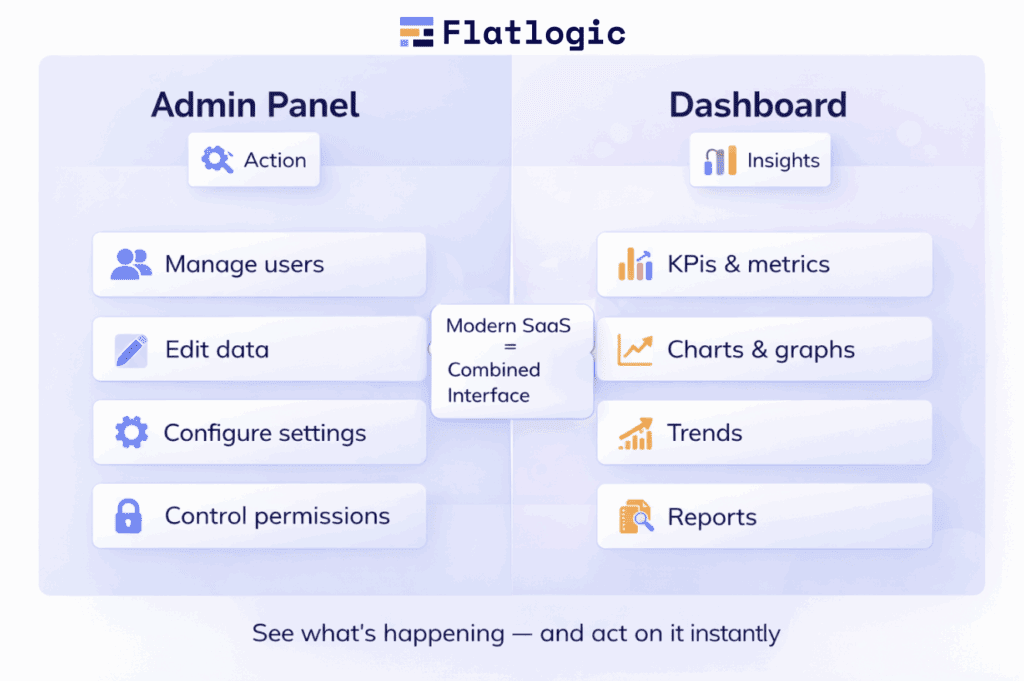
An admin panel is primarily focused on management and control. It allows internal teams to perform actions such as managing users, editing data, configuring settings, handling billing, and controlling permissions. In short, it’s where operations happen.
A dashboard, on the other hand, is designed for visibility and insights. It presents data through charts, metrics, and visualizations, helping teams monitor performance, track KPIs, and make informed decisions.
The key difference is simple:
- Admin panel = action
- Dashboard = insight
In modern SaaS applications, these two concepts are often combined into a single interface. For example, an admin panel may include built-in dashboards to give teams both control and context in one place.
Understanding this distinction helps teams design better internal tools, ensuring that users can not only see what’s happening but also take immediate action when needed.
Build vs Buy: What Should Startups Choose?
One of the key decisions startups face is whether to build an admin panel from scratch or use a pre-built solution. The right choice depends on your resources, timeline, and product complexity.
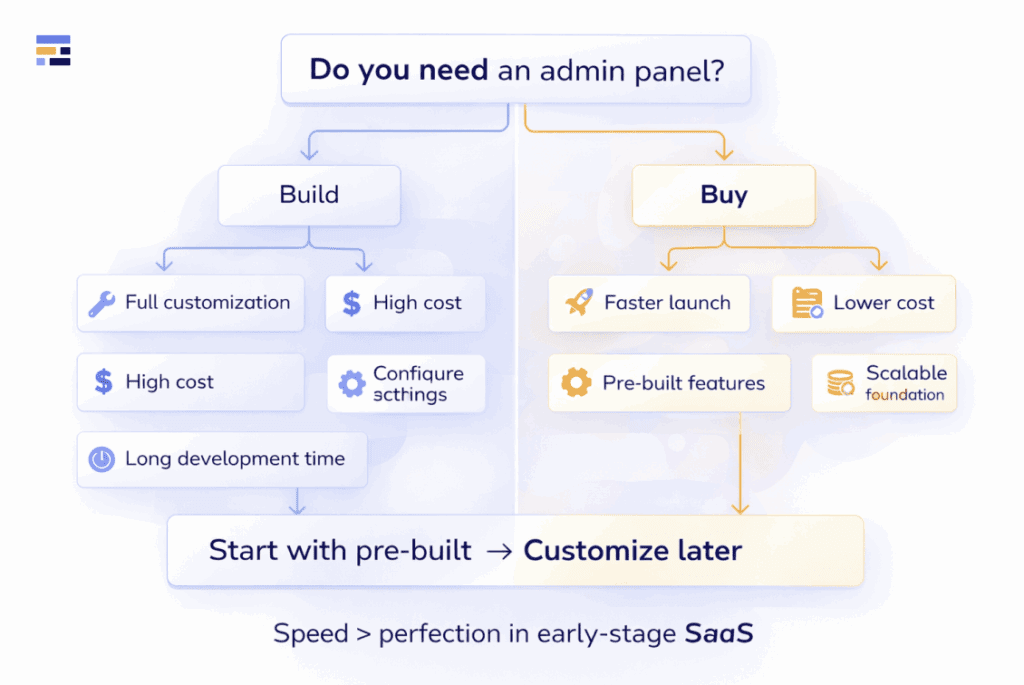
Building from scratch gives you full control and customization. You can tailor every feature to your exact needs and integrate it deeply with your product. However, this approach is time-consuming, expensive, and requires ongoing maintenance, which can slow down your core product development.
Buying or using a pre-built solution allows you to launch much faster. These tools come with ready-made features, best practices, and scalable architecture, helping you avoid reinventing the wheel. The trade-off is less flexibility, though many modern solutions offer strong customization options.
For most startups and SMBs, the practical approach is to start with a pre-built solution to save time and resources, and only consider building a custom admin panel later when your needs become more complex and clearly defined.
In early stages, speed and focus matter more than perfection, and choosing the right approach can significantly impact how quickly you bring your product to market.
Common Mistakes When Designing Admin Panels
Designing an admin panel may seem straightforward, but many teams underestimate its complexity. As a result, they create tools that are difficult to use, hard to scale, or even risky from a security standpoint.
One of the most common mistakes is overcomplicating the interface. Trying to include too many features at once often leads to cluttered layouts and poor usability. Admin panels should prioritize clarity and efficiency over visual complexity.
Another frequent issue is ignoring role-based access control. Without properly defined roles and permissions, teams risk exposing sensitive data or allowing unintended actions, both of which can have serious consequences.
Teams also often fail to plan for scalability. What works for a small user base can quickly break as the product grows, leading to performance issues and operational bottlenecks.
Additionally, poor performance and slow data handling can significantly reduce productivity. Admin panels are used daily by internal teams, so speed and responsiveness are critical.
Finally, many startups overlook the importance of analytics and visibility. Without built-in insights, teams lack the context needed to make informed decisions and improve the product.
Avoiding these mistakes early can save time, reduce costs, and ensure your admin panel remains a reliable backbone for your SaaS operations.
How Admin Panels Drive SaaS Growth
Admin panels are often seen as internal tools, but their impact goes far beyond day-to-day operations, they play a direct role in driving SaaS growth.
First, they enable faster iteration. Teams can quickly adjust settings, test features, and respond to user feedback without relying heavily on engineering resources. This speed allows startups to experiment, learn, and improve their product continuously.
Second, admin panels improve the customer experience. Support teams gain instant access to user data and activity, making it easier to resolve issues quickly. Faster support leads to higher satisfaction, better retention, and stronger word-of-mouth growth.
They also support data-driven decision-making. With built-in analytics and reporting, teams can track performance, identify trends, and prioritize features that deliver the most value. This reduces guesswork and aligns product development with real user needs.
Finally, admin panels help reduce operational costs through automation and efficiency. By streamlining workflows and minimizing manual work, startups can scale their operations without proportionally increasing team size.
In short, a well-designed admin panel doesn’t just support your SaaS product, it actively accelerates its growth.
Future Trends in Admin Panels
As SaaS products grow in complexity, admin panels are evolving from simple management tools into intelligent operational platforms. Several key trends are shaping their future.
Smarter Decision-Making with AI
Artificial intelligence is becoming a core component of modern admin panels. Instead of just displaying data, systems are beginning to:
- Detect anomalies automatically
- Suggest actions based on patterns
- Provide predictive insights
This shift helps teams move from reactive to proactive decision-making.
Real-Time Everything
Static dashboards are being replaced by real-time interfaces. Live data streams allow teams to:
- Monitor user activity instantly
- Track system performance in real time
- Respond to issues without delays
This is especially important for fast-growing SaaS platforms where timing matters.
Modular and Flexible Architectures
Admin panels are becoming more composable. Rather than relying on rigid, all-in-one systems, teams can:
- Add or remove features as needed
- Customize workflows easily
- Scale-specific components independently
This flexibility supports long-term growth and changing business needs.
Consumer-Grade User Experience
There is a growing expectation for admin panels to feel as polished as user-facing products. Modern interfaces focus on:
- Clean, intuitive design
- Faster navigation
- Reduced cognitive load
Better UX directly improves team productivity and reduces onboarding time.
Overall, the future of admin panels is about intelligence, speed, flexibility, and usability. For startups and SMBs, adopting these trends early can provide a significant competitive advantage.
How Flatlogic Helps
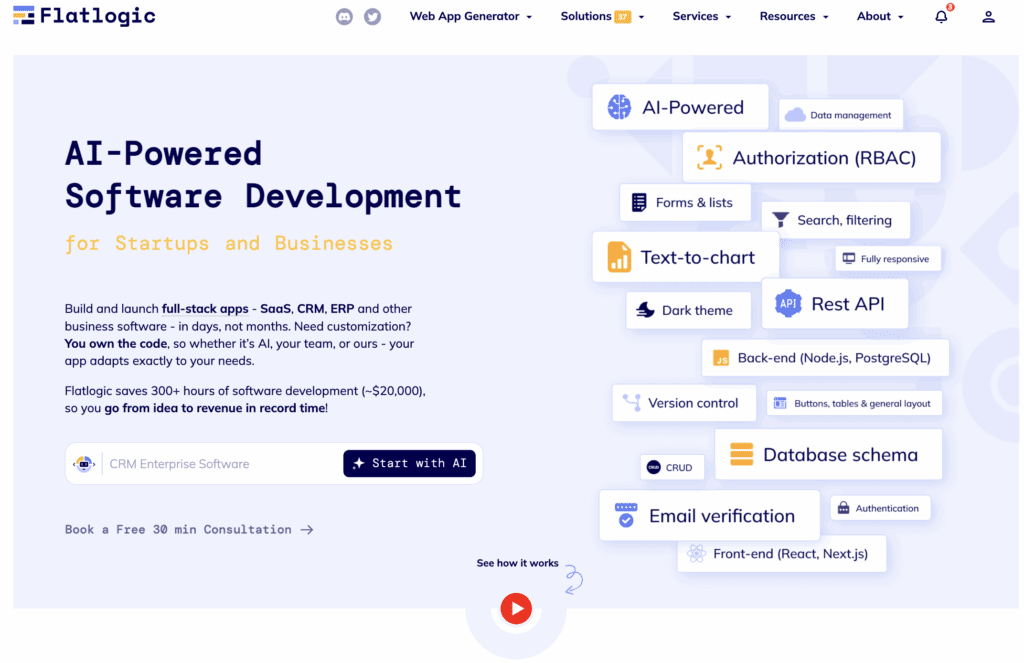
Building an admin panel from scratch can take significant time and resources, something most startups and SMBs want to avoid. Flatlogic simplifies this process by providing a platform that generates full-stack applications with ready-to-use admin panels.
With pre-built features like authentication, user management, and dashboards, teams can launch much faster and focus on their core product instead of internal tooling.
At the same time, Flatlogic remains flexible. Developers can customize the data model, extend functionality, and adapt the interface to fit their specific needs.
In short, Flatlogic helps startups reduce development time and costs while still building scalable, production-ready admin panels.
Conclusion
In modern SaaS, the admin panel is no longer just a supporting tool hidden behind the scenes; it is a critical part of how your business operates, scales, and delivers value to users.
As we’ve explored, a well-designed admin panel brings structure to complexity. It centralizes operations, empowers teams with real-time insights, improves customer support, and enables faster, data-driven decisions. For startups and SMBs, this is especially important: limited resources demand tools that maximize efficiency without slowing down growth.
Choosing the right approach, whether building or using a pre-built solution, and focusing on the features that truly matter can significantly impact your product’s success. At the same time, avoiding common mistakes and staying aligned with emerging trends ensures that your admin panel remains scalable and future-proof.
Ultimately, the question is not whether you need an admin panel, but how well it supports your team and your business goals. The better your internal systems work, the faster you can iterate, the better you can serve your users, and the more confidently you can scale.
Treat your admin panel as a strategic asset, and it will become one of the strongest drivers of your SaaS growth.